Ligneous Blogger Template
This template does not have a responsive design.
Instructions
About Ligneous
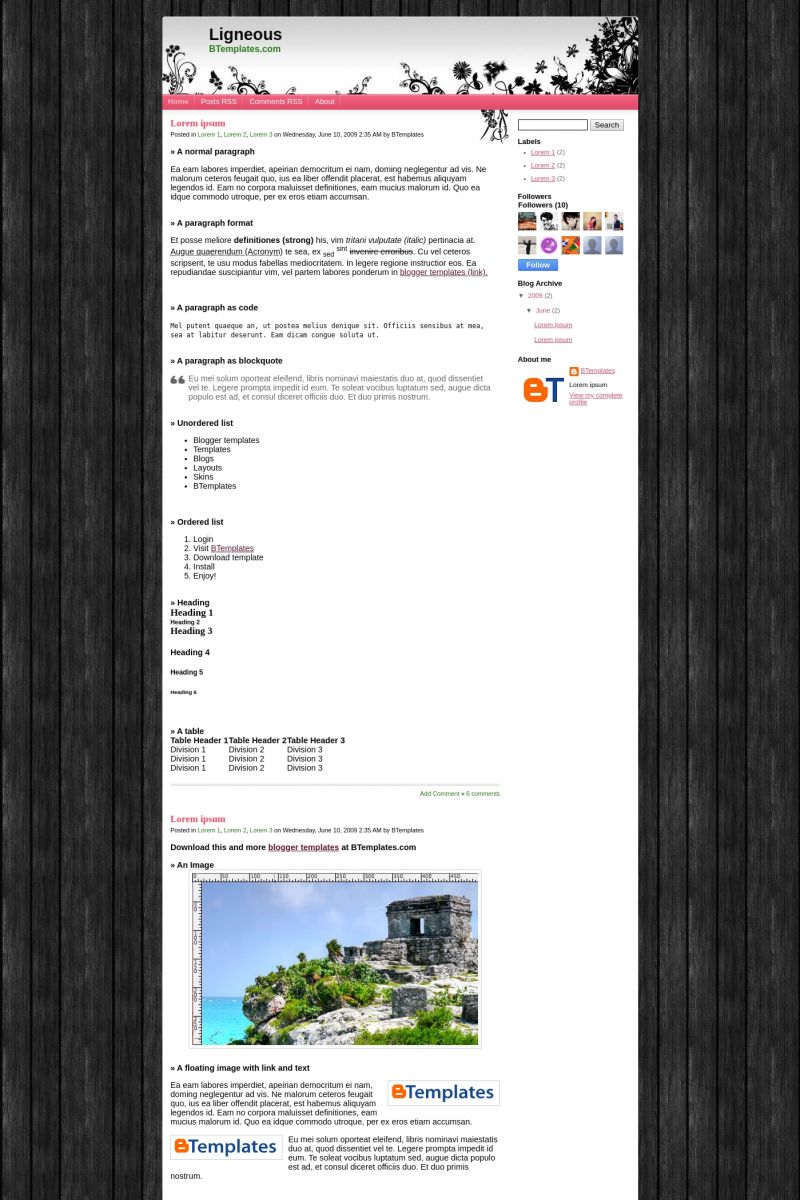
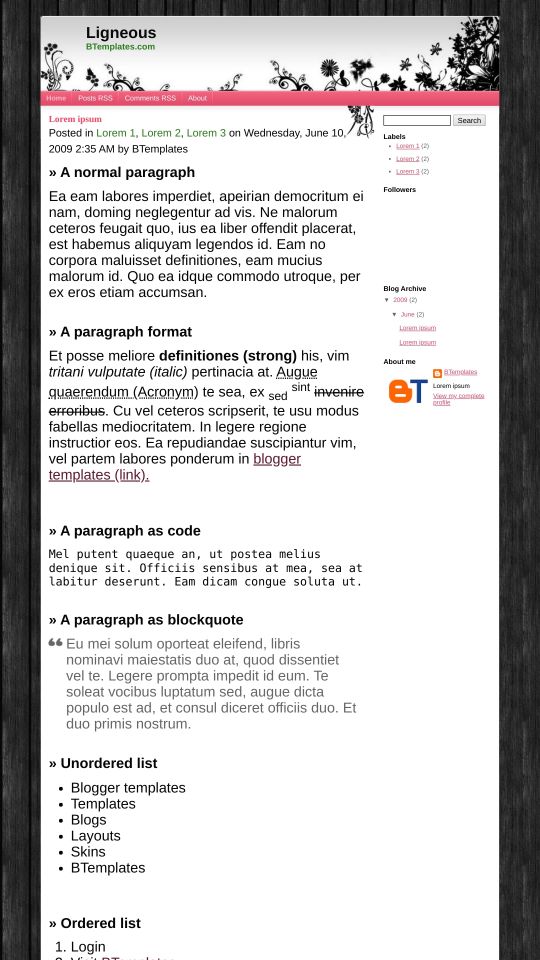
Ligneous is a free Blogger template adapted from WordPress with 2 columns, right sidebar, fresh look, rounded corners, grunge style, girly looking and floral motifs.
Excellent template for blogs about to write a diary.
More Girly Blogger templates:
Credits
Author: ChicaBlogger.
Designer: Pure Essence.
Karina 10 June 2009 at 14:03
Kawaii demais!! ^^
piupiu 11 June 2009 at 1:54
hi!
May i know how do i add Adsense, chatbox, or more items at the side bar?
I know ntg about HTML. so when i uploaded the layout, it says some of the things will be deleted.
Please advice how i maintain it where it is..while using your layout!
Thank you!
br
Lydia
Claudia 11 June 2009 at 2:51
Lydia: Create a new HTML/Javascript gadget and paste the code there ;)
The gadgets are always deleted when you upload a new template, so you must make a backup of your gadgets content.
Jerick Mac 11 June 2009 at 11:27
hello! it looks great but you need to fix some of its error. Try clicking the archive, the post title were gone. Hmmmm. Please consider it…
Claudia 11 June 2009 at 15:43
A little error because of conditional headings… but fixed. Thanks :)
yuyee 11 June 2009 at 19:21
is there really no “sign out” button once uve uploaded a new template??how will i sign out my account?
Claudia 12 June 2009 at 1:40
Sign out button? Where?
Zeekaa 12 June 2009 at 13:49
hi claudia,
may i know if its possible to change the header picture to one of our own?
afiq 13 June 2009 at 12:33
there’s no place to comment?
& can u add dashboard button there? TQ!
Claudia 13 June 2009 at 21:36
Zeeka: Find the “ligneousHeader.jpg” image in the template
afiq: What do you mean? I don’t understand :S
Jessica 15 June 2009 at 1:41
HI THERE..
I JUST LOVE THIS THEME BUT YOU HAVE TO FIX SOME STUFF WITH IT. I CANT CHANGES TEXT TO ARIAL OCH TAHOMA AND SO ON.. I LOVE THE THEME BUT I WOULD LIKE TO CHANGE TEXT LAYOUT.
THNX
Jessica
(sorry for my english, I’m from sweden, but I hope you understand anyway)
Claudia 16 June 2009 at 1:05
No fixes to do. I decided to not include variables in this template (sorry). Change the font-size in the .post-body selector.
Jerick Mac 17 June 2009 at 6:23
how do i change the post title font?
I want to change it to:
1. Font = Arial
2. size = H1
Please help me to do this. thanks so much claudia!
Kye Siobhan 19 June 2009 at 18:03
When i try to uplaod the file it says that the XML files are no in order. what do i do?
evelyn 19 June 2009 at 22:03
thanks a lot! very nice :D
Claudia 22 June 2009 at 1:37
Jerick:
Change the “font-size” value in the “.post h3” selectors. You may add “font-family:Arial”, too.
Leah 3 July 2009 at 21:23
You did a great job, I love it :) this will be a no-brainer for you but how do I remove the boldness of the title of each post? It’s pink and bold, just want to make it not so bold looking.
You’re talented, thank you for sharing with us!!
Noerdy 9 July 2009 at 3:22
nice template..
how to change pink font color to blue color..??
thx..
Virginia 9 July 2009 at 10:08
Hi Claudia, I love this design, it’s beautiful! Thanks for sharing. I was just wondering, is it possible to take off the flowers coming out of the header onto the posts’ page? I changed the header to one of my own so it looks a bit bizarre with the black design now… just wondering. Thanks a lot for making it though!!
Deb 9 July 2009 at 18:49
Hi Claudia. I think this is a great design! I’m just having a few problems. I’d like to add more gadgets, but I’m not allowed. There’s only one option to add html code. Once used you can’t get another one. I tried adding Blogger Gadgets for HTML source code but I get an error with this as well.
Is there a work around for this problem?
rebeca 13 July 2009 at 2:49
So perfect!!
I loved it xD
Congratulations people!
kisses =*
Meliha 18 August 2009 at 20:41
I’m interested in using this template, but I tested it out on my blogger.com site and the text area on the top where the profile description is supposed to show up is too long and causes some of the words to get lost in the flowery area on the far right. Even with it green and bold, it is still UNreadable…
Meliha 18 August 2009 at 21:49
Ok so I got the text at the top to be readable by putting in manual s in the Description text of my blog site.
I have a few more questions:
1) When I click on “Posts RSS” and “Comments RSS” at top, I get this error on my own blog site:
User does not have permission to read this blog.
2) Can you tell me what line to look for to change the blog titles to sans-serif to match the rest of the fonts?
3) Can you tell me what line to look for to change the comments and label link colors from green to something else? Searching in the code for “color” is difficult since there are over 100 references to “color”.
Also, the top blogger/blogspot nav bar (the one that says Follow Blog / Search Blog / Flag Blag / Dashboard / Sign Out is missing from the top of the page ever since I changed to this template.
Thanks for any help you can provide…
Claudia 19 August 2009 at 2:30
Melinha:
1) I think it must be a problem with your blog template (not a problem of the template). Check your settings:
2) Edit the following CSS selectors: #header h1, #header h2.
3) Change:
a {
color: #621730;
}
a:hover {
text-decoration: none;
}
4) Remove:
#navbar, #navbar-iframe {
height: 0px;
visibility: hidden;
display: none;
}
We always hide the navbar. I think it’s ugly :(
Jenna 19 August 2009 at 20:23
Love this blog template.
Is there a way to make more followers visible? Make the box wider or longer. It seems to have maxed out at 25.
I don’t write code so plain step by step of where to click and what to adjust would be SOOOOO helpful!
Jenna
Lea 28 August 2009 at 11:26
When i try searching for something on the search bar, no result comes up.
Claudia 29 August 2009 at 4:17
Lea:
There are not problems with the search bar, really.
Melissa G 26 September 2009 at 21:56
Hi Claudia,
I absolutely love this template. I’m new to all of the code work and these new templates. So I’m hoping you can answer some questions for me. Sorry if they seem dumb.
Below the header there are tabs for Home, Post RSS, Comments RSS, and About. When I click on the About, it doesn’t take me anywhere, and I can’t figure out how to edit it. I would like to make that an ‘About Me’ tab.
Also, I would like to add other tabs or replace the content and title of the Post and Comment RSS. Is that possible? And can you please tell me how?
And when I go to Arrange Items while configuring my blog posts, they won’t move to where I want them to be. Ex: I want the labels to be at the bottom of my post, not under the title. And even though it is saved that way in the configuration, it still shows up the wrong way when I view my blog. Is that something you can help me with? Or is it maybe just a glitch?
Thank you in advance for you time!
Melissa G 26 September 2009 at 22:03
One more thing! When I deleted the code for the navigation bar, it took away the blackboard background. I kinda like it that way, but how can I make the everything fit to size now? Does that make sense? Like having it full screen view?
I hope my questions or editing aren’t breaking any “template creator etiquette”. =) Please let me know if I am.
Thanks again!
Claudia 29 September 2009 at 3:48
Melissa: Please, Read the FAQ (the link is above). That will help you to setup the menu bar (adding and removing tabs).
If you want to move the labels to the bottom, you need to do it in the HTML edition (I’m sorry, there is not another way).
Be careful when you remove or edit HTML code because you might delete an important part of the template ;)
Meliha 17 October 2009 at 12:39
I’m seeing a problem with the Blog Archive widget and I’m starting to wonder if it’s because of the custom template.
Basically, the blog archive widget is not showing the true # of entries (is about 5 entries off). Some total #s on months are wrong and other months (when I know there were blog entries) don’t even show up. Can you just let me know if this is a Blogger problem or something related to the custom template? No one else seems to be having an issue with it…which is why I started thinking maybe it’s related to the custom template.
The widget code is:
Thanks
Meliha 17 October 2009 at 12:40
Oops did the widget really not show up in the reply? That’s strange…how do I paste the code then?
Thanks
Melissa G 18 October 2009 at 23:32
Claudia,
I’m still really new at this. I couldn’t understand the directions in the FAQ’s. I know – I’m lame. If you can help me with the adding/removing/editing tabs, I would be really grateful.
Thanks.
VenusCR 28 October 2009 at 14:19
It is possible to have it on 3 columns?
Kanwal 6 December 2009 at 23:32
Great template. How do you increase the font size of “Add a comment”. Please reply soon. Thank you.
Claudia 8 December 2009 at 1:59
Kanwal:
Search for this piece of code (in Layout/HTML edition):
And increase the “font-size” value ;)
Kristiina 12 January 2010 at 9:05
the template is excelent and cute , but how can i put back the small button under every post, were i could directly go and ” edit post ” ?
and one more thing, i dont know , maybe this is my fault but, when i have a longer post , and i want to leave blank space ( about 2-3 lines ) between the new sentence, i can’t do it. it writes all together unstaffly.
Looking forward to Your answer , thanks !
JChevais 15 January 2010 at 11:14
No comments are requests for help. I just want to say that you made a lovely template. Bravo.
JChevais 15 January 2010 at 11:14
No comments or requests for help. I just want to say that you made a lovely template. Bravo.
Pat Schuessler 2 March 2010 at 9:44
I have photos in my previous blog and when I changed to this template, there is a line around the photos and if you click on them, they “open”. I don’t want people to be able to click on the photos and be taken to a larger photo. How do I change this?
How do I upload a photo to this template?
Claudia 3 March 2010 at 14:39
Pat:
I’m not sure if you want to delete the border around the images or if you want to delete the links of all images. They are two different things. If you only want to delete the border, go to Edit HTML, find this code and remove it:
Manoela Komka 22 October 2010 at 2:20
Hello Claudia,
Please wanted to know how to change the names and links of ‘Posts RSS’, ‘Coments RSS’ and ‘About’ and if it is possible. Can? And if so, how?
Sorry some failure in English, but I am Brazilian and I’m using Google Translate. :)
I love your work, are my favorites! : D
Kisses, good luck in future templates!
Manuuh Komka.
Claudia 22 October 2010 at 9:56
@Manoela Komka You can find the answer to your questions and more in our FAQ section.
Jennifer 5 March 2011 at 8:30
Hola, me gustaria saber como se canvia lo de hoe, comments, edit, kiero decir los botones de arriba del odo
Gracias conestame porfi
Claudia 5 March 2011 at 20:38
@Jennifer: Ve a Diseño/Edición de HTML y encuentra el siguiente código:
Puedes cambiar los links y añadir más ítems si gustas.
Robi 27 August 2012 at 13:02
Hi, Claudia! Nice work you have. By the way, is there a way to change the language? I want all to be English.
Thank you and I’m looking forward to reading your reply very soon.
– Robi
Robi 27 August 2012 at 13:08
Ops, I’ve just got the answer. Thanks, anyway.