Natural Health Blogger Template
This template does not have a responsive design.
Instructions
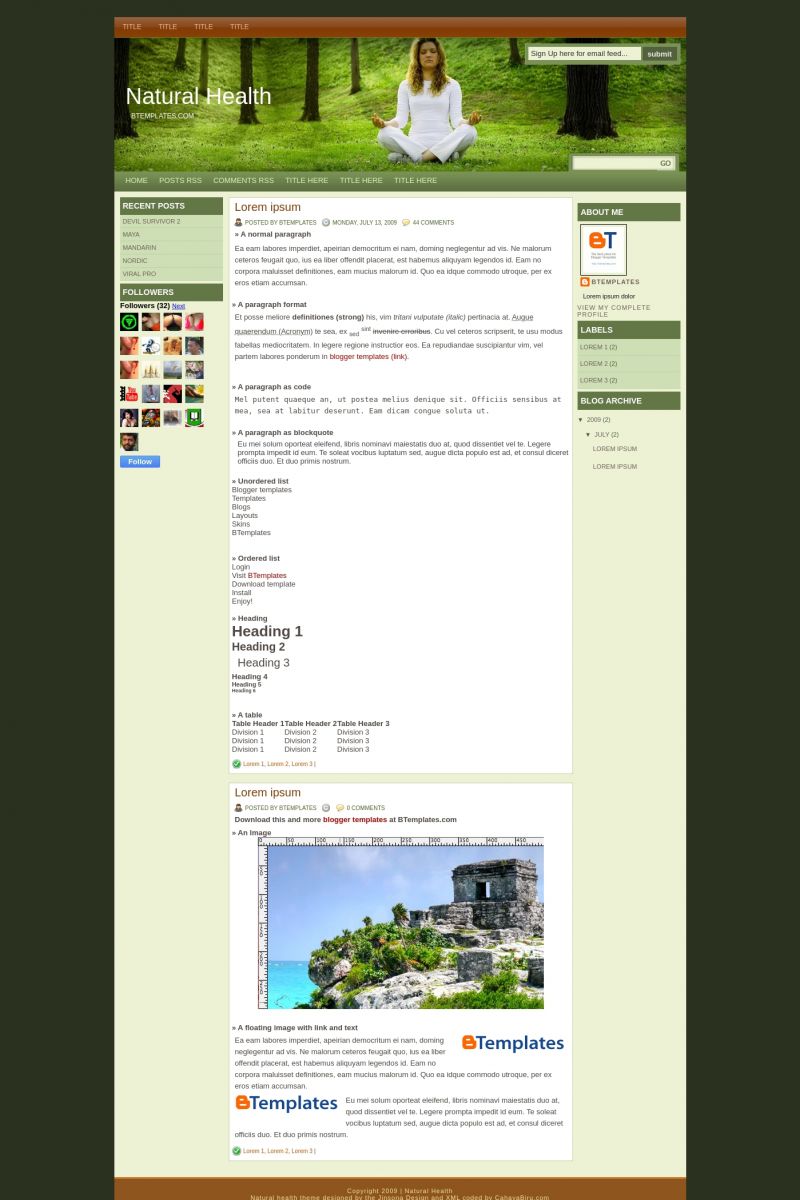
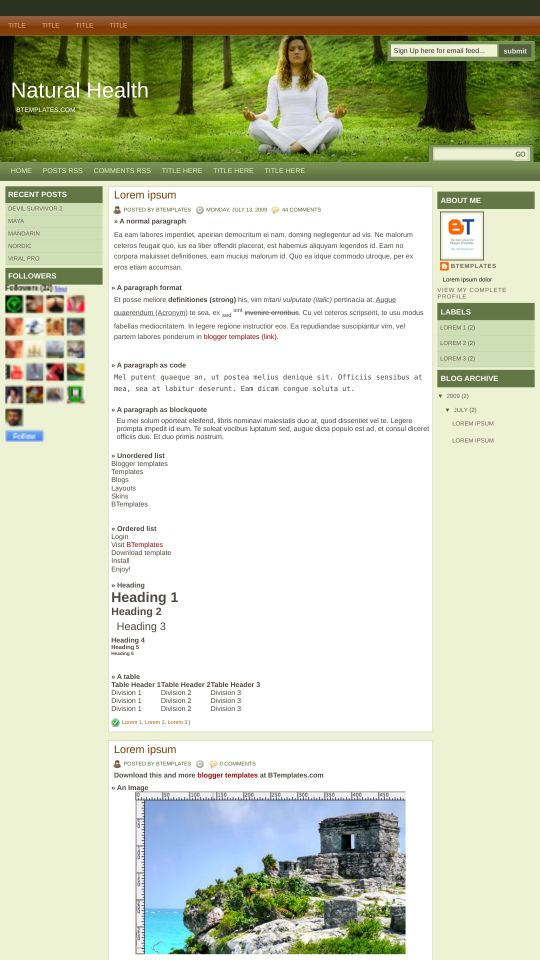
About Natural Health
Natural Health is a free Blogger template adapted from WordPress with 3 columns and left and right sidebars.
Excellent template for blogs about nature, people or photography.
More Adapted from WordPress Blogger templates:

Credits
Author: Cahaya Biru.
Designer: Web2Feel.
Orijinal Delikanlı 14 July 2009 at 6:53
Fena değil sağlık konusunda yayın yapan bloglara gider…
Arthur 14 July 2009 at 14:33
Muito Bom esse Template esperei muito tempo para poder baixar vocês fazem um belo trabalho aqui postando os templates convertidos de WP para Blogger a categoria que eu mais adoro e a de Magazine iclusive tenho um template que e muito bom para essa categoria e gostaria de saber como faço para enviar para vocês ?
Claudia 14 July 2009 at 19:55
Arthur:
Do not leave your e-mail if you don’t want to receive spam in your e-mail box ;)
If you want to send us a new template, please go to the “Submit template” section.
Floyd 15 July 2009 at 0:20
Nice, I just got this one set-up, thanks for this great looking template.
GE 16 July 2009 at 20:42
Great template , real cool
Carlos 25 July 2009 at 17:00
Claudia, he buscado todas las formas para insertar el “SIGA LEYENDO” y no hay manera, es el único problemita que tengo en esta nueva plantilla.
Te agradecería de tu ayuda.-
Carlos
prefabrik ev 2 September 2009 at 6:26
thnak you good
Sonya 16 September 2009 at 0:52
Hi there,
I love your template and have just started using it. I do have one question though as I’m not a wizard when it comes to computers and can’t seem to figure it out.
The links on the top of your template where it says ‘Title’ three times I have managed to change the name of, but the link isn’t working.
How do I make it so it does work and when someone clicks on it a new page comes up?
Can you help a girl out?
Thanks so much,
Sonya
Claudia 16 September 2009 at 4:09
Sonya:
You don’t need to be a wizard :D Simply use the search form of your browser (Ctrl+F if you use Firefox) and type “Title” ;)
then 29 September 2009 at 14:40
very simple, but i like this…
Ashley 5 October 2009 at 17:26
hi, i can’t quite figure out how to change the “home” “posts rss” “feeds rss”, etc to other things. I have tried pasting my own addresses in the html code and it does not work!
great template otherwise, thanks so much!
Kat 6 October 2009 at 18:12
I want to do something with the title thing that is at the top four times and three times a little further down. Can I just delete these for simplicity? And if so, how?
Kike 11 October 2009 at 0:57
Claudia, a wonderful template, I tried all possible ways to add a script to contrigan and expand the entries and I could not. For example for the line to replace it and nothing.
Please let me confirm that it is possible to add a script to contract and expand and if so. What should I add, thank you very much for the template.
I am also fond of meditation
Claudia 11 October 2009 at 3:23
Kike:
You can add scripts to any template. Search in google for “read+more+blogger”, and I’m sure you will find at least one tutorial useful for your blog.
:D
Kike 11 October 2009 at 15:24
Thanks, yes I have already made entries down (read more…) in previous templates. I’m no expert on html, but I’ve worked with other templates and I’ve had difficulties. With your template, I have not worked any command sequence that previously had used. So was my question.
Unfortunately, and I really liked your template had to use one where if you work or I will run the command read more ..
Sorry about my English from the google translator because I speak only Spanish. Thanks for answering.
Jane 3 December 2009 at 16:26
How do u change the header picture?
Claudia 4 December 2009 at 17:37
Jane:
Find this link in your template, and replace it by yours:
Your header image must be 1000px × 234px.
inessenco 6 December 2009 at 4:31
Claudia, thans for this template, but there is something trouble when i wrote bullets, I can’t made it happened in my article.
Shane 24 December 2009 at 1:15
It is really a superb template, I am using it with my new blogs
My problems is that I can’t use bullets and numbers in my posts
Kindly suggest some solution
Regards
Christian 29 December 2009 at 13:58
Hey, Claudia.
I just installed your template and really like it.
But there is a problem with the ‘Search-field’. After entering and submitting a keyword, i got the message:
That the site i am looking for, does not exist. But I know it exists. I tried the search form by google and it works with the same Keyword (Sry for my bad english).
But your search-field looks much cooler and I want to use it. Any Idea where is the problem?
If there is no solution, could you tell me, how to remove only the search-field in the header? So I can use just the one of google.
Big thanks
Claudia 1 January 2010 at 18:42
Go to Layout/HTML edition and replace:
by:
Tell me if it works ;)
Guust 3 January 2010 at 0:30
Hey, Claudia.
This is a really great template. It looks very good and is usable by advanced users and beginners. But I got the same problem as Christian. :-( I tried your solution and the standard blogger template was swapped with your one. That is great but I still dont get any search results. Also changed Blogger the HTML code in:
So I get some “quot thingies” added?
I also tried to change “homepageURL” into the actual url but that didn’t work.
And I have a second question. :-)
I tried to delete in the text in the header picture (Natural Health BTemplates.com) but that isnt so easy for a HTML newbie as me. I want to change the header picture and photoshop the text on it. That looks a bit better.
Thanks in advance and thanks again for a great template.
Greetz,
Guust.
Christian 3 January 2010 at 6:17
Hey, Claudia. BIG THX!
It works perfectly :3
:-*
Claudia 3 January 2010 at 15:25
Guust:
Please, read my previous comments. I already answered some of your questions.
Regarding the searchform, you can also try with this:
by:
It's a relative search route (not right at all), but at least it will work.
Regards! :)
Tina 5 February 2010 at 15:34
Hi Claudia!
First of all, wonderful template. Just was wondering how I could delete the blog title and create my own onto my background photo. Or if possible, how would I change the alignment of the original blog title?
Your help would be greatly appreciated!
Best Regards,
Tina
Claudia 8 February 2010 at 19:43
Tina:
Try with
It will hide the blog title and description. Tell me if it works ;)
Ayman 14 February 2010 at 16:54
To all of those who can’t install Read More hack, just apply these steps..
http://buzz.blogger.com/2009/09/you-might-as-well-jump.html
Well done, and really wonderful template
Angie Hurst 19 February 2010 at 23:34
Loaded easily! Many thanks!
Kalra 24 February 2010 at 10:27
I have the same problem Sonya has. I changed the names from “title” to what I want but when I lick on the new title name nothing happens. I get that if I search for the new title name it will come. I assumed these were “title” pages and when clicked on the page would come up. Is that not right?
viveiro 25 February 2010 at 20:52
Muito bons seus templates procurei muito tempo para encontrar.
Parabens!
TALsite 3 March 2010 at 13:46
Hi Claudia
I’m testing this template before changing. It’s a GREAT template, but I had a problem with the search box.
I have changed the line as you say:
form expr:action=’data:blog.homepageUrl + “search/”‘
but it only displays searchs of the entries posted after changing the template. (?)
Do you know what’s the problem?
Thanks.
====
Hola Claudia
Estoy probando esta plantilla antes de cambiarme a ella. Es una GRAN plantilla, pero tengo un problema con la función de busqueda
He cambiado la siguiente linea como decías:
form expr:action=’data:blog.homepageUrl + “search/”‘
pero solo devuelve busquedas de las entradas publicadas después de haber cambiado la plantilla. (?)
¿Sabes cual es el problema?
Gracias. Un hispanohablante.
Claudia 3 March 2010 at 14:13
TALsite:
No, no debería pasar (de hecho, podría deberse a la “autopaginación” implementada por Blogger hace un par de semanas). Si cambiaste el código, debería andar todo bien. También puedes probar con la alternativa de mi comentario del 3 de enero (january). Mira más arriba ;)
TALsite 3 March 2010 at 15:29
Claudia: “También puedes probar con la alternativa de mi comentario del 3 de enero”
Lo he probado también y no funciona.
La suscripción por correo funciona bien, todo está bien, menos el buscador. Una pena.
Además quería “volver a publicar el indice” o “todo el blog” como leí en un libro, para ver si lo solucionaba, pero no se puede. Debía ser en versiones anteriores de Blogger.
Gracias.
Hettie 18 April 2010 at 16:42
Thanks for this great template i realy love it. But i got a question. How can i delete or change the collor of the green bars in the comments? :-) I hope you can help me. Thanks in advance.
Regards Hettie,
http://img16.imageshack.us/img16/1633/templatesc.jpg
Claudia 19 April 2010 at 20:58
Hettie:
Add this CSS in Layout/Edit HTML:
Hettie 19 April 2010 at 21:47
Hi Claudia,
I changed this piece in the HTML-code and it seems to work. :-) Thanks a lot for the quick response and great answer.
Best regards,
Hettie
Nestism 30 May 2010 at 1:15
tnx for solving the search button issue…. continue to inspire bloggers.
chanakit 29 July 2010 at 2:22
Simple and nice.
gabryel 1 September 2010 at 12:10
Hi Claudia, thanks for this wonderful template!
I want to know if i can make this “Show avatars on Blogger Comments” like here:
bloggerplugins.org/2009/09/show-avatars-on-blogger-comments.html
I have been trying but without succes.
Regards!
David Vinueza 23 September 2010 at 14:41
Hola Claudia, me encanta tu plantilla, la uso en mi pagina, por favor ayudame con una inquietud, me gustaria poner una animacion flash en la cabecera, o mas claro cambiar la foto de la cabecera por una animacion flash, ayudame como puedo hacer esto???
Hello, I want to have a header flash, How Can I do??
Saymon 14 January 2011 at 10:27
Very nice template ! However, the bullet in the blog content is not working. Also i dont know how to put comment icon below the post unlike in the top…
TALsite 15 January 2011 at 4:23
Hola Claudia.
Uso esta plantilla y estoy muy contento, pero he detectado dos problemas:
-Escribiendo una entrada, intercalo una foto, y todo el texto que sigue después aparece con una SEPARACION DE LINEAS menor que en el párrafo anterior a la foto. Puedes verlo en una de mis entradas antiguas. La verdad es que el efecto es bastante feo
-En configurar entradas del blog, aunque lo tengo marcado, no aparecen los BOTONES PARA COMPARTIR
Un saludo.
Agus 17 January 2011 at 22:32
Nice template.. I have download it.. Thank’s n_n
latipz 15 June 2011 at 8:40
Nice Template but I think blue color is better.. ^_^
selva 24 June 2012 at 6:21
how can I change my cover picture?
Hettie 19 November 2012 at 16:43
This is still a great template i realy love it. I use it for 2 weblogs. But i got a question. Suddenly black Bars appeared in all topics (both weblogs). Please, can you help me?
Kind regards,
Hettie.
http://i48.tinypic.com/2nu2bft.jpg
Hettie 22 November 2012 at 15:09
Problem solved. :-) Probably a temporary Blogger bug.
Ümit KÖSE 8 June 2013 at 4:38
very good
thank you
ashena 13 December 2013 at 1:33
It was great thanks