Water Color Blogger Template
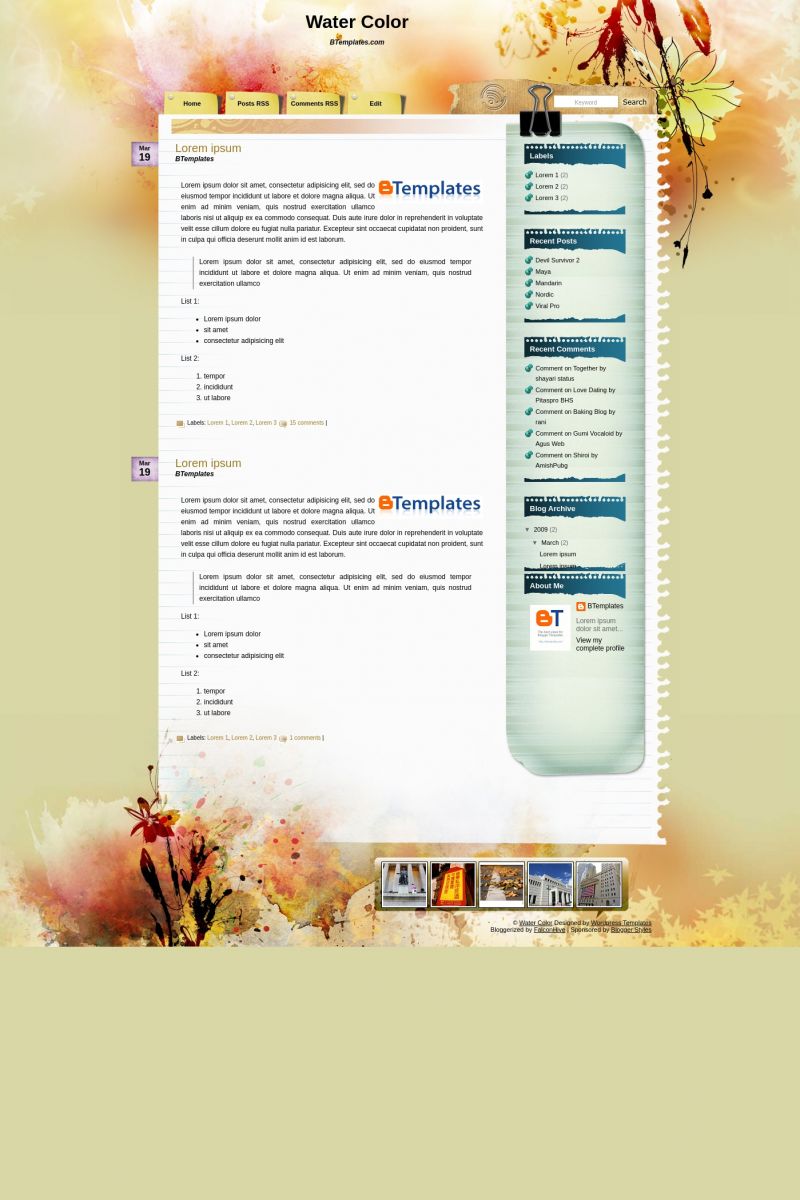
This template does not have a responsive design.

Instructions
About Water Color
Water Color is a free Blogger template adapted from WordPress with 2 columns, right sidebar, fresh look, grunge style and floral motifs.
Excellent template for blogs about art or fantasy.
More Art Blogger templates:

Credits
Author: Falcon Hive.
Designer: TemplateLite.
emily 28 July 2009 at 18:38
GRR! its saying error why woulnt it let me upload it??
Gabrielle 30 July 2009 at 14:49
hi i just downloaded this template Water Color and need help with the date tabs.
mine are saying “undefined.” HELP!
Thanks a bunch
Gabrielle 30 July 2009 at 14:56
Nevermind i figured it out!
timestamp format.
https://2.bp.blogspot.com/_Zt-MFCckzsc/Sawa2PqreYI/AAAAAAAABA8/NCB3FGRb3fo/s1600-h/image.png
Loribeth 30 July 2009 at 18:26
How can I get the search box to search my blog instead of going to the site that tells about the layout? If that can’t be changed, I’d like to remove it, because people are trying to search my site with it, getting redirected and getting upset. Can’t have that happening with my blog!!
marion 3 August 2009 at 14:48
Thank you very much for the nice Template.
But I have a problem with the date.
How do you fix the date tab? It says undefined!
swaar 4 August 2009 at 2:50
Thank you very much for the nice Template im go 2 Download now
doctor 9 August 2009 at 8:35
Hi..Date is not working for this templete..can you please help me?
Thanks.
Lady Jess 10 August 2009 at 13:50
To get rid of the “Undefined”
https://2.bp.blogspot.com/_Zt-MFCckzsc/Sawa2PqreYI/AAAAAAAABA8/NCB3FGRb3fo/s1600-h/image.png
cheehou 13 August 2009 at 7:40
thank you so much lady jess… your image totally help me realize how foolish i was. i keep changing the date header instead of time stamp
ragattozza 14 August 2009 at 6:56
Thanks so much for your sharing….
Lisa 24 August 2009 at 19:46
The Blogger toolbar at the top of the page is missing. You know, the one that allows you to click on your dashboard, sign out, etc. Any ideas for how to get it back on my page?
Claudia 24 August 2009 at 22:03
Lisa: Idea -> Please, read the FAQ ;)
Allison 28 August 2009 at 0:12
does anyone know how I can get my flickR photos to show up?… all I can see is a blurry box with a scewdriver and wrench. I tried changing the format but I must not have done it correctly…
NeverBANNED 9 September 2009 at 11:03
I use this great template !!!
Smita 13 September 2009 at 6:18
Thanks fr the great template! One big problem is that I can’t seem to use any widgets after uploading this. I wanted to put on my blog roll and an image on the side bar. Can you please tell me how I can do this?
moshtry 23 September 2009 at 1:31
thanx alot :D
marco 28 September 2009 at 10:53
en la plantilla no aparece las pestañas de la parte superior como se puede hacer para que aparesca
Claudia 29 September 2009 at 2:19
Marco:
Anda a la sección de Elementos de la plantilla. Cerca del header vas a encontrar un widget de lista de enlaces. Allí puedes poner los links que quieres que se muestren en el menú.
Saludos ;)
MARCO 29 September 2009 at 10:59
Gracias Claudia ya lo hice y quedo bien .
saludos
Jane 29 September 2009 at 23:04
Did anyone else have trouble with the Flickr gallery at the bottom of the page? I followed the instruction in FAQ but it’s not working.
ANDRES 30 September 2009 at 10:12
Como se puede activar la caja de SEARCH, para que funcione el buscador y no te envie a la pagina del autor
Lorra 3 October 2009 at 11:35
Hi, I’m just wondering if I’m allowed to tweak this to fit our blog’s purpose. :)
Derek McCrea 6 October 2009 at 15:25
I am going to install this on my blog right now, thanks for the sharing.
Noe 8 October 2009 at 10:08
Gracias por esta plantilla. Tenía problemas con la fecha pero pude solucionarlo con los post de arriba. Es simple!…
Suerte!
Arya 18 October 2009 at 6:20
Thanks for Template… It’s beautiful ^^
I’m going to use this…
Nise 18 October 2009 at 7:30
thanks Gabrielle & Lady Jess! totally fixed my prob! before this, i didn’t understand what the others meant… (^^)”
Gee 18 October 2009 at 14:15
Thank u btemplates… It’s really nice and beautiful…
Danny 21 October 2009 at 15:11
How do you add photos to the flick tab at the bottom? When I try to edit there is just space for text. Help please?
wahnon 9 November 2009 at 13:22
i love th template, its wonderful :D
only one problem… people want to add me, and there’s no bar on the top to do that… how can people follow my blog?
Amanda 11 November 2009 at 8:02
Oh Beautiful Thanks
mesecina 15 November 2009 at 14:57
Hello,
I have downloaded ‘water-color’ template from ‘btemplates’. It is wonderful, however I have a problem in changing the color and fonts. When I click layout >fonts and color nothing appears and I dont know how to write codes to change it.
I would be very happy if you could tell me how to change the color and font.
Thanks
Mesecina
Klafkid 6 December 2009 at 8:23
Hey guys,
First, thats a very cool template.
Now, my problem is, that when I try to put in a “read-more” fiel in my blogs, it just cuts off the post, without posting any link for reading more.
Well, I asked Bloggers Help, and I found something:
It says, I have to search for
in the HTML-Code and put
under it.
Well, I just can’t find “”. Can you help me?
I have lots of long posts, and thats gonna make my page too long.
Would be nice if you answer :)
Klafkid
Klafkid 6 December 2009 at 15:29
Sorry, it cutted my codes,
here again: (Everything without the Spaces)
Thats what I have to search for.
Klafkid 6 December 2009 at 15:33
Okay, got it, forgot to tick the square right above ;)
Klafkid 13 December 2009 at 15:31
Hey, again :D
I got problems with the comment function.
First, the captcha is not shown, you have to click somewhere there.
And then you can see the captcha, but there is no submit botton, under windows. Well it’s there, but it’s cut off.
Please help.
costa 17 December 2009 at 8:07
Hey guys~ I am new in Blogger! Can u help me customize this template? I have uploaded it in my blog but i want to add some boxes like CONTACT and BIO etc and be able to link them to my email and write a text to Bio. Can u help me out? Send me an email!
Thanx
Charlotte 12 January 2010 at 18:14
Thanks soooo much for the beautiful template! I love it :D
McKahveci 17 January 2010 at 9:04
thank you very much lady jess :)
KrisSquared 31 January 2010 at 18:34
Beautiful template. Only problem I’m having is with flickr – the included widget, when used, overlaps the copyright and sponsor information at the bottom. Any solution for this? Thanks!
Denise 16 February 2010 at 12:04
I would like to have the same theme for my twitter account. Is there a way to incorporate this in twitter in the near future? Thanks for the beautiful template!
Sarah 25 March 2010 at 18:03
To make the flickr application actually show pictures:
Go to:
Layout
Page Elements
Flickr
Type:
and replace “YOUR-FLICKR-ID” with the number that appears in the url of your flickr account.
And it should work!
Joanna 26 March 2010 at 12:04
Thanks Jess for your link to help the “undefined”…I would rather actually NOT have the date there at all but it is better to have the date than “undefined”~!!
Joanna 26 March 2010 at 12:11
I cannot seem to get the TABS at the top of the blog…what do I do?
Claudia 29 March 2010 at 12:57
I think your design is just breath-taking – and I installed it – but get an undefined date at all my posts.
I have a german layout and I tried all the different date formats – but nothing worked.
Can you give me a hint what to do? I think it’s because the date in the template is only “Mar 14” and I don’t have the possibility to choose such a short format.
Can I change my layout to english or can I program sth. in html?
Would be glad to hear from you – I would not want to choose another design – I really like yours (but don’t like posts without a date….)
Claudia
Anandiprema 1 April 2010 at 14:20
@ claudia.
I had the same problem as you – I thought because I am working on Spanish Blogger.
But look here – it is quite easy to fix the date
https://2.bp.blogspot.com/_Zt-MFCckzsc/Sawa2PqreYI/AAAAAAAABA8/NCB3FGRb3fo/s1600-h/image.png
thank you very much to the one who fixed it out and make it so easy to see…
(sorry my english)
Anandiprema 1 April 2010 at 14:59
me encanta el diseño.. pero aunque me he leído todos los postings y FAQ varias veces, tengo algunos problemas (mi inglés tampoco es muy bueno). Soy totalmente nueva en lo del blog.
1.) las pestañas arribas – han desaprecido. Me gustaria poner uno con home, otro con “contacto” y otro con “about me”… ¿cómo lo hago?
2.) la busqueda… cómo consigo que busque en mi blog y que no se vaya a otra página?
3.) las fotos abajo…no están. y no entiendo los posting aquí en inglés como hacerlo…?!?
4.) en general – se puede hacer que en las entradas solo se ve algunas líneas (texto corto) y se pincha y se va al contenido entero?
Claudia 1 April 2010 at 20:00
Anandiprema:
Te faltó hacer click en en link de “Template Settings” que está más arriba. Las pestañas se configuran desde la edición de elementos de la plantilla. Eso también te permite resolver el problema de las fotos de flickr que aparecen abajo. Si tienes problemas con el inglés, usa Google Translate (translate.google.com).
Para resolver el problema del buscador, busca lo siguiente en Diseño/Edición de HTML:
y reemplázalo por:
Anandiprema 2 April 2010 at 2:30
Muchas gracias Claudia! He hecho lo que me dijiste, pero – a probar el buscador – me sale una pagina blanca con:
No se puede mostrar la página web
Causa más probable:
Algunos archivos o contenido de esta página web requieren un programa que no está instalado.
Puede intentar lo siguiente:
Buscar un programa en línea para poder ver este contenido web.
Volver a escribir la dirección.
Regresar a la página anterior.
Jen Bee 2 April 2010 at 6:12
This is stunning, thanks.
One question, is it possible to alter/remove the author’s name from beneath the title post?
Anandiprema 2 April 2010 at 7:20
He intentado fijar el marco para que las letras se queden en el blanco con las instrucciones más arribas.. que dice…
width:980px;
in
#container{
position:relative;
background:url(https://1.bp.blogspot.com/_XByc9SCisZM/ScH6DPhxMxI/AAAAAAAABjU/rwrfWIhB9AI/s1600/bg_container.jpg) no-repeat top center;
margin:0;
padding:0;
border:0px blue solid;
width:980px;
}
El resultado: las letras ya se quedaban al lado izq dentro del blanco, PERO… más abajo, el blanco terminó y las letras estaban encima del marróncito…
Os agradecería vuestra ayuda, ya que soy totalmente novata en blogger.
Claudia 2 April 2010 at 13:41
Anandiprema:
No tienes que hacer ningún cambio adicional en el CSS. Prueba con:
Debería funcionar.
Jen:
Add this CSS code to your template:
.author {
display: none;
}
Anandiprema 2 April 2010 at 15:42
Hola Claudia, muchísimas gracias por intentar ayudarme :-)))
Pero tampoco… lo he cambiado y no pasa nada… aquí la dirección si quieres echar un vistazo… http://institutoterapias.blogspot.com/
Lo del margen izquierda aún tampoco lo he sabido arreglar, igual que las fotos al final – y eso que he hecho todo lo que pone FalconHive en su página…
.. y supongo a las paginas nuevas (las pestañas arriba) no se puede añadir las entradas… solo una, no?
Muchas gracias!!
Naa 3 April 2010 at 23:25
Hi loving this template but I don’t have the edit shortcut beneath the posts next to the comments. Is there a way to add this? Thanks
Naa 3 April 2010 at 23:40
Loving the template. But how do i restore the quick edit shortcut at the bottom of each post? Thanks
Anu 5 April 2010 at 13:12
Hi,
I liked this template. Quick Editing (pencil image) is not appearing below the post. How should I enable in. In post setting It is enabled.
Also search is not working. Can anyone help in this.
gama 11 April 2010 at 4:37
this amazing templates!!!!!!
Sehidy 21 April 2010 at 21:36
thanks, is nice the template, but i can not to fix the purple box with UNDEFINED i dont know what can i do, please help me. i from costa rica.
Sehidy 21 April 2010 at 21:52
graciasssssssssssssssssssss, ya me funciono
Thick-Ink 30 April 2010 at 20:45
the comments arent working?
help!
Claudia 30 April 2010 at 22:01
@Thick-Ink: You can find the answer to your questions and more in our FAQ section.
Anandiprema 6 May 2010 at 13:47
I have a problem in changing the color and fonts. When I click layout >fonts and color nothing appears and I dont know how to write codes to change it.
I would be very happy if you could tell me how to change the color and font.
Thanks