Gridster Blogger Template

Instructions
- How to install a Blogger template.
- Additional Settings:
- You need to replace the neutral Feedburner ID with yours that make the email suscription box work.
- To edit the social icons links you need to search and changes the urls directly in your template code.
About Gridster
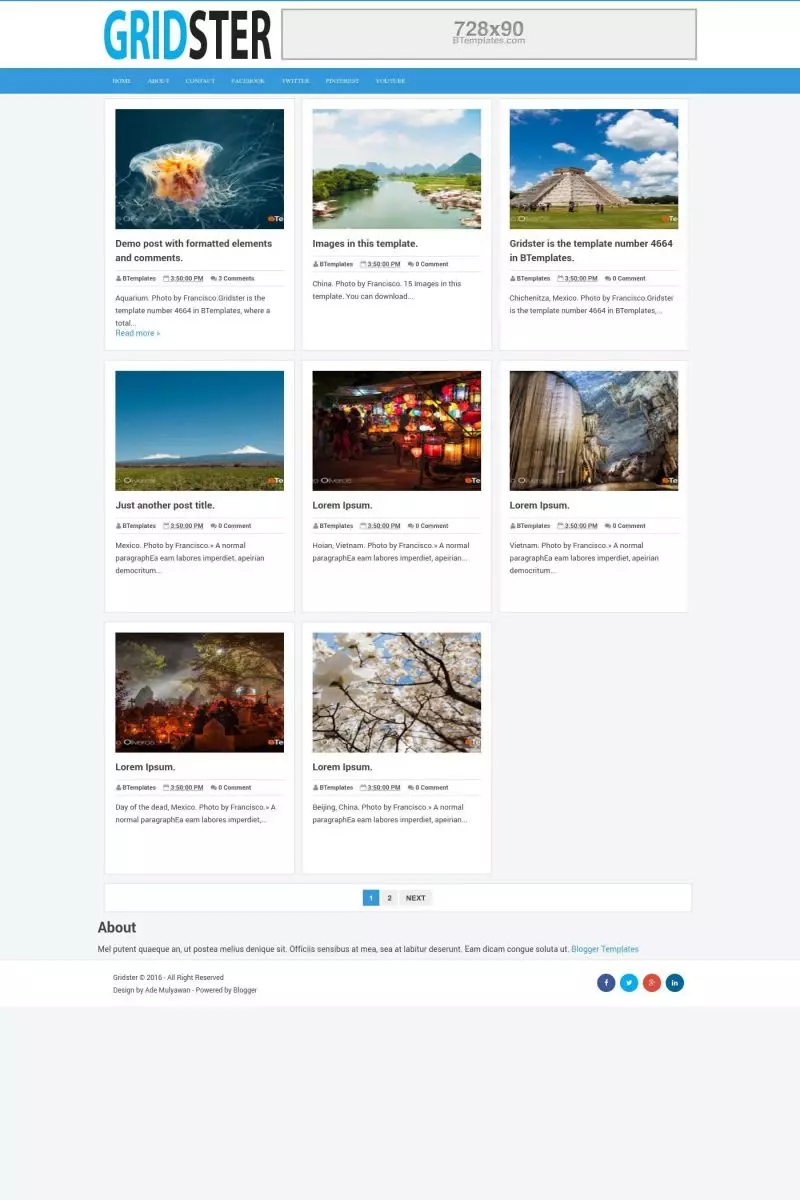
Gridster is a free Blogger template designed for simplicity and visual appeal. Its clean two-column structure with a right sidebar ensures easy navigation, while the gallery-style layout highlights post thumbnails for a dynamic presentation. SEO-friendly features, ad-ready spaces, and social media integration make it practical for both content creators and audiences.
The template prioritizes user experience with breadcrumb navigation, numbered pagination, and a related posts section. Threaded comments encourage engagement, and the neutral palette keeps the focus on content. Minimalist design elements ensure fast loading and distraction-free reading.
Ideal for design-focused blogs, photography portfolios, or creative showcases, Gridster balances aesthetics and functionality. Its exclusive Blogger optimization ensures seamless performance, making it a versatile choice for professionals and hobbyists alike.
More Portfolio Blogger templates:


Credits
Author: Kezzeter.
Riri 29 July 2016 at 7:52
File is damaged.
tukang 11 August 2016 at 2:40
how to customize static page? I want make it 1 column an full page
Gabriel Miranda 12 February 2017 at 5:43
Solo cambia
.post {float:left;width:100%;max-width:295px;
por
.post {float:left;width:100%;max-width:100%;
gabriel miranda 12 February 2017 at 12:20
Locate this section of the code
.post {float:left;width:100%;max-width:295px;height:400px;background:#FFF;border:1px solid #DDD;margin:0 0 16px 12px;padding:18px 18px 22px 18px}
h2.post-title, h1.post-title {font-weight:bold;font-size:17px;font-family:'Roboto',Open Sans,Arial,sans-serif;line-height:1.5em;}
Replace it with this other code to avoid conflict with the cover as it does with the indications of my previous comment
.post {float:left;width:100%;max-width:295px;height:400px;background:#FFF;border:1px solid #DDD;margin:0 0 16px 12px;padding:18px 18px 22px 18px}
h2.post-title, h1.post-title {font-weight:bold;font-size:17px;font-family:'Roboto',Open Sans,Arial,sans-serif;line-height:1.5em;}
.post {float:left;width:100%;max-width:100%;height:400px;background:#FFF;border:1px solid #DDD;margin:0 0 16px 12px;padding:18px 18px 22px 18px}
h2.post-title, h1.post-title {font-weight:bold;font-size:17px;font-family:'Roboto',Open Sans,Arial,sans-serif;line-height:1.5em;}
With this it is sufficient so that functions of correct way so much in the cover as it is the static pages
MakeModelCreate 3 December 2017 at 2:57
To change the static page layout so that it is full width the same as the post layout follow the below instructions.
Navigate to the section with the Static_Page code, search for the below string:
in this section replace the below text
.Post {float:none;height:auto;width:auto}
with this text below
.post {float:none;height:auto;width:100%;max-width:690px;margin-left:0;}
This will make the pages show perfectly, I am currently using this on my website
Aksa Sahi 7 September 2016 at 9:30
IT IS TOOOOO COOL
SUARDANA 15 September 2016 at 22:43
LUAR BIASA
Xiara Kova 30 November 2016 at 1:03
I like this template but I encountered 2 problems, thumbnail/images of my posts at homepage and related posts did not show up. Please help. I’m hoping you can help me resolve the issue. Thank you!
GSS 26 January 2017 at 10:02
This template is very good.
Thank you
Julio 10 March 2017 at 2:29
Hello
Why only show four post?
and
the navigation bar of posts isn’t show
Help me please?
Thanks
abeeb 4 June 2017 at 16:06
sorry this is what bloggeris telling me when im tryingto upload this theme i have downloaded the viral theme “We were unable to save your theme.
Your theme could not be parsed as it is not well-formed. Please make sure all XML elements are closed properly. XML error message:
Content is not allowed in prolog.”
naidu 9 September 2017 at 21:52
I like this template but I encountered 2 problems, thumbnail/images of my posts at homepage and related posts did not show up. Please help. I’m hoping you can help me resolve the issue. Thank you!
kartik kamra 22 September 2017 at 0:14
I like this template but I encountered 2 problems, thumbnail/images of my posts at homepage and related posts did not show up.
kartik kamra 22 September 2017 at 0:14
Its nice the template
Dencil Pumps 5 October 2017 at 2:44
Interesting template. The way you explained each point with necessary details and maintained good balance is really commendable. Thanks for sharing your view. – plunger pump, plunger pumps
Indra 18 November 2017 at 23:15
halaman Pertama kenapa cuma 5 Postingan….?
halaman ke 2 6 Postingan
Hilang 1 Postingan tolong di cek dan di perbaiki
TQ
ridwan 7 January 2018 at 21:08
Why navigation menu in mobile not working? any help?
Serdar Duman 9 January 2018 at 1:15
Aynen. Böyle bir temayı çok aramıştım:(
Serdar Duman 9 January 2018 at 1:14
I was so happy. But the menu does not open in mobile view. I am very sorry now: ((
Binod 20 March 2018 at 1:37
Exactly the navbar menu is not responsive
Sunil Kumar 28 October 2018 at 5:05
This one is very nice template. I always download from your site.
Mayur 3 November 2018 at 3:53
very nice template ….for image website or blog website
Dheeraj Kumar 24 May 2019 at 10:40
How can I link social network (facebook, twitter, linked in) in the footer section? Anyone Help Me!! I am new here.
Rahul Singh 3 July 2019 at 16:17
Thank you for giving such a wonderful theme.
ajmal 23 August 2019 at 4:29
This one is very nice template. I always download from your site
Francisco 27 August 2019 at 21:04
I’m glad you find this site useful :)
suv 10 October 2019 at 1:11
cute grid post theme beautiful
Mubashar Khalil 4 December 2019 at 22:15
I like this template
vito 11 January 2020 at 22:59
this template..ok..
Brian 2 February 2020 at 22:09
Great template.
Probably a stupid question from someone new to web design using Blogger:
Can someone tell me how to change the width of the Page text in the different pages (not main Blog page)?
Thank you
krishna jangid 3 June 2020 at 2:34
why navigation bar not working in mobile
Francisco 13 June 2020 at 6:44
Hi, Krishna. Looks like the template is having a Javascript error, try deleting this line:
document.getElementById('fb-root').appendChild(e);Let me know if it helps.
Haithum 12 July 2020 at 12:01
Thank you for the amazing template. I want to know how to make photos adjust when showing in the homepage? it appears with cut margins to both right and left.
Julien 28 November 2020 at 15:25
Hi,
That’s a great theme, the look is amazing!
I just have an issue with the thumbnail post picture on the homepage. The images are pixely.
How can i fix that?
Thanks
Julien
zakir ali 6 January 2021 at 13:04
this template is my favorite templete.
Odziez uliczna 9 March 2021 at 2:41
On my phone i have problem with this theme! is not friendly look, not like your screen. I have old android 5 Huawei cun 01. why i have this problem?
Francisco 9 March 2021 at 23:56
Hello, Odziez, the screenshot was taken using Mozilla Firefox. Is it maybe because of a old browser version?
Andrew 4 September 2021 at 1:52
It´s a wonderful theme, but why navigation bar not working in mobile?
Dhiraj 31 October 2024 at 12:47
page list (check box) is not working in mobile
Andres 8 December 2024 at 13:06
Por alguna razón siento que le falta algo a esta plantilla. La noto un poco incompleta.
hoa-nd 26 February 2026 at 8:28
How to change color from blue to orange? please
Francisco 3 March 2026 at 15:37
Hi! To change the blue color to orange throughout the Gridster template, you need to replace all instances of
#3498DBwith your preferred orange color code (e.g.,#FF6600or#E67E22).Step 1: In your Blogger dashboard, go to Theme → Edit HTML
Step 2: Press
Ctrl+F(orCmd+Fon Mac) to open the search boxStep 3: Search for
#3498DBand replace ALL instances with your orange color. Here are the main locations you’ll find it:a:link{color:#3498DB...anda:visited{color:#3498DB....header a:hover {color:#3498DB;}#themenu{width:100%;max-width:1058px;margin:0 auto;height:45px;background:#3498DB;}#themenu ul li:hover a{color:#FFF;background-color:#0578A5...(change#0578A5to a darker orange like#CC5200)h2.post-title a:hover, h1.post-title a:hover {color:#3498DB...#blog-pager-older-link a:hover...{background-color:#3498DB...blockquote{border-left:3px solid #3498DB....breadcrumbs a:hover {...color:#3498DB;}.label-size {transition:all .3s;background:#3498DB....related-post h4 {background:#3498DB...#subscribe-box .emailfield .submitbutton{background:#3498DB....pagenavi .current,.pagenavi .pages{background-color:#3498DB...#back-to-top{...background-color:#3498DB...and#back-to-top:hover{background-color:#3498DB....comment_name a:hover {...color:#3498DB;}.dropdown-menu li a:hover{color:#3498DB!important}.PopularPosts ul li a:hover{color:#3498DB;}.comment_admin .comment_name {...(border-bottom if needed)Step 4: Also search for the darker blue shade
#0578A5(menu hover background) and replace it with a darker orange like#CC5200or#D35400Step 5: Click Save Theme
Quick tip: If you want to use a specific orange, here are some options:
•
#FF6600– Pure orange•
#E67E22– Pumpkin orange•
#D35400– Burnt orange•
#F39C12– Golden orangeMake sure to replace every instance of
#3498DBso the color scheme stays consistent throughout your blog!