Free Blogger Templates for your Blog

Hybrid News

live demo
Features:
Instructions:Template Settings / How to use this template
Template author:FBTemplate
Designer:
Description:

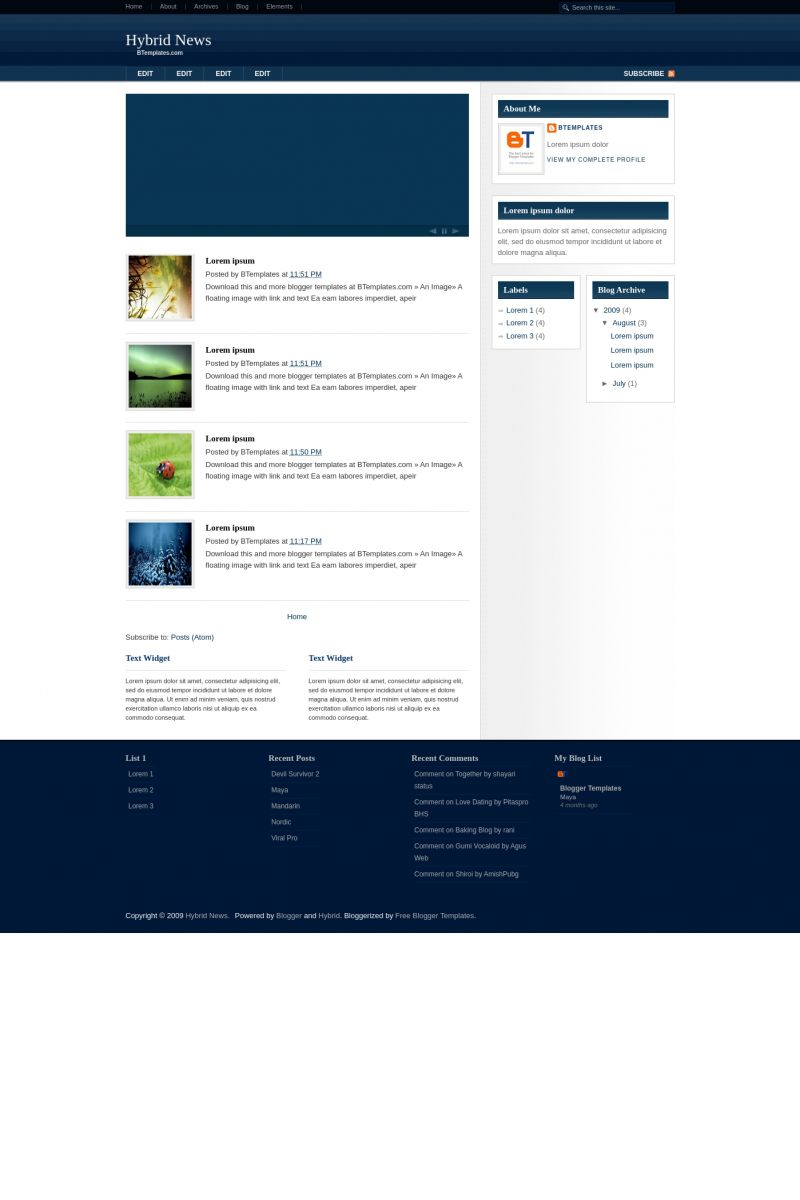
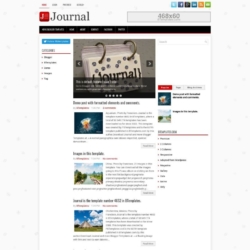
Hybrid News is a free blogger template adapted from WordPress with 3 columns, right sidebar, magazine-styled, neutral colors and posts thumbnails.

Download Hybrid News for free in BTemplates.
Rating4.3 out of 5 based on 86 bloggers.
Compatible with:FFIEChrome
Share:

Comments about Hybrid News blogspot template

75 Comments, leave a reply »
  1. an 6 August 2009
    Reply to an »

    waw cool i like it

  2. alotothink 6 August 2009
    Reply to alotothink »

    Perfect template. Just love the whole layout. But, having trouble editing and customizing my slide bar and and Side photo. Where exactly do I edit them in html file?

  3. shaz 7 August 2009
    Reply to shaz »

    can we remove the slide image?..or change the content? If can be done, how to do it?..tq

  4. Mardi 7 August 2009
    Reply to Mardi »

    wow.
    awesome. I like this template. I like slide image,

  5. mas asyiqin 11 August 2009
    Reply to mas asyiqin »

    Templates very good deh pokokek TOPBG

  6. mas asyiqin 11 August 2009
    Reply to mas asyiqin »

    Mantab deh templates

  7. pernikahan 11 August 2009
    Reply to pernikahan »

    bagus neh template, bis di edit juga, penambahan widget flash menambah tampilan blog makin oke.

  8. syniezam 11 August 2009
    Reply to syniezam »

    very nice template, but somehow, i don’t know how to change the slide show.. can anybody help. Plzzzzzzzzzzzz….

  9. syniezam 11 August 2009
    Reply to syniezam »

    ok thanks, everything looks fine now..haha..just another touch-up will be ok..and for those who have the same problem like me, here is how to settle it.
    Find this code:
    Change yourblogname with your blog feeds or blog feed by category/label like this

    http://yourblogname.blogspot.com/feeds/posts/default/-/yourbloglabel

    =>Find this:
    startposts = 0;
    numposts = 1;
    home_page = “http://hybridnews-fbt.blogspot.com/feeds/posts/default”;

    startposts = 1;
    numposts = 2;
    home_page = “http://hybridnews-fbt.blogspot.com/feeds/posts/default”;

    change : “http://hybridnews-fbt.blogspot.com/feeds/posts/default”;
    with :http://yourblogname.blogspot.com/feeds/posts/default/-/yourbloglabel

    FYI : you need more than2 post add least.

    Just try to help..eheh..hehe..
    syniezam

  10. jenelle 12 August 2009
    Reply to jenelle »

    thanks syniezam

    that was really helpful.

    do you know how to change the pictures?
    or how to add more slides?

  11. mike 14 August 2009
    Reply to mike »

    Nice template dude. Just put it on my blog. One question: after the 3rd post we keep changing the post:# to the next number to get them to rotate? thanks! and join the trump network

  12. Peter 14 August 2009
    Reply to Peter »

    I copied and pasted the html to get a 3rd slide to rotate through, but can’t get the “full story” button to come along. Is there a quick fix?

  13. TOPNews 15 August 2009
    Reply to TOPNews »

    great template..
    thank you

  14. mike 15 August 2009
    Reply to mike »

    ok can somebody help me? what html do we copy and paste to get more than 2 slides to rotate? I am not that good with html so could you please tell me exactly what to copy and what to change? thanks so much and i will leave you in my will if you help me.

  15. cyberman 15 August 2009
    Reply to cyberman »

    Thnx mate :)
    amazing :)

  16. cyberman 15 August 2009
    Reply to cyberman »

    hey admin i want to remove the slider
    please help me please!!

  17. VSS 17 August 2009
    Reply to VSS »

    I can´t to get more than 1 slide.
    How can i edit menu?

  18. VSS 17 August 2009
    Reply to VSS »

    Ya logré ajustar los menú horizontales. Pero solo logro que me salga un slide.

  19. amanda harr 17 August 2009
    Reply to amanda harr »

    hey admin, i really need to remove the slide, is that possible?

    great template
    thanks

    amanda

  20. VSS 18 August 2009
    Reply to VSS »

    ¿Como hacer que salgan las imagenes en el slide, cómo hacer que salga más de un post?

  21. Rui Oliveira 19 August 2009
    Reply to Rui Oliveira »

    Why images of Posts are Not Visualizaed.

    Can anybody JHelp Me?

    Regards

    Rui

  22. Bruno 21 August 2009
    Reply to Bruno »

    I use it on my blog :D cool template :D

  23. ProgresoHoy 23 August 2009
    Reply to ProgresoHoy »

    He tenido problemas con el template en el sentido de la carga de imagenes. He aplicado el teplate y lo he configurado, pero luego de unos dias de utilizarlo, las imagenes no cargan adecuadamente y el teplate no aparece completo. A que se debera?? saludos

  24. ProgresoHoy 23 August 2009
    Reply to ProgresoHoy »

    cómo puedo sustituir el banner de google ads que aparece a la altura del encabezado y poner uno propio?? ya sea un swf o un gif?

  25. Claudia 24 August 2009
    Reply to Claudia »

    ProgresoHoy: Cambia el hosting de las imágenes a imageshack u otro ;)

    Hey guys: If you need to know hot to set up the slideshow, please click on the “Template Settings” link above.

  26. simpsmix 25 August 2009
    Reply to simpsmix »

    How I can change the images ?

  27. ProgresoHoy 25 August 2009
    Reply to ProgresoHoy »

    gracias clau! lo intentaré

  28. Reply to Jose Antonio Zapata Cabral »

    Great template…! Works like a charm in my site. Thanks dude…!

  29. puspita 9 September 2009
    Reply to puspita »

    Great Template… Thankx!

  30. jennifyt 14 September 2009
    Reply to jennifyt »

    Can someone tell me how to change the text on the slide show?

  31. Rui Oliveira 15 September 2009
    Reply to Rui Oliveira »

    Hi jennifyt:

    The text scrols automaticly around the last posts.

    Please see the Post above of Zyniezan on Aug, 11th 2009.

    And you can view a number of last “Posts” as you wish.

    Regards

  32. RV 18 September 2009
    Reply to RV »

    Hi,
    Thanks for the wonderful template. It works great.

    Q1:
    I am trying to include the total number of comments for each post in my blog. But my code fails and ruins the blog. Can you please tell me how to include the total number of comments for each post in my blog.

    Q2:
    Is there a way to display the number of view per post?

    Appreciate your help.

    Thanks in advance.

  33. pnpncat 29 September 2009
    Reply to pnpncat »

    It’s too cool to be true! Can I download your template and use only part of your code in my blog? I’ve tried hard to find some way to do as this. I’ll be very happy if you give me the right.

  34. Chick 23 October 2009
    Reply to Chick »

    Dear All

    I am a newbee to all this coding. I have managed to upload the template but not quite sure what code to look for for the three ” edit” words under the blog title. I need to change them but am getting it wrong.

    Please advise.

  35. Juan Valencia 4 November 2009
    Reply to Juan Valencia »

    Hi everybody! NIce Template, but can someone tell me how i put the “Read more” in my posts?

    Thanks

  36. Abraham 12 November 2009
    Reply to Abraham »

    Hola, ya tengo la plantilla en mi blog, pero podria alguien decirme como invertir el orden de las entradas, es decir que la ultima entrada publicada quede hasta abajo del blog?
    Gracias.

  37. bloggero 12 December 2009
    Reply to bloggero »

    si pueden ayudenme, quiero quitar esas molestos link que aparcen cuando se da clic en un elemento de la plantilla, porfavor no quiciera tenerlos, ¿Se puede quitar? y en que lugar de la plantilla hay que modificar, gracias.

  38. Abraham 14 December 2009
    Reply to Abraham »

    Hola Bloggero a que link te refieres, por que ya revise tu blog y no encuentro cual te molesta, explicame y veo en que te puedo apoyar.

  39. bloggero 14 December 2009
    Reply to bloggero »

    Se trata de publicidad que aparece cuando doy clic en algunos link, no sale siempre pero en ocaciones molesta.

  40. Claudia 14 December 2009
    Reply to Claudia »

    Bloggero:
    La publicidad no es parte de la plantilla.

  41. bloggero 14 December 2009
    Reply to bloggero »

    Gracias por contestar; pero como la elimino?

  42. Abraham 15 December 2009
    Reply to Abraham »

    Bloggero estuve revisando tu blog y al parecer los links que te aparecen son de algun directorio opaguina con la que enlazas tu blog, algununa pagina que en su link de reciprocidad tiene habilitada esa funcion, y tendrias que revizar tus enlaces para que puedas saber cual es y poderlo borrar. Espero que esta informacion te sirva.
    Y siguimos en contacto.

  43. alemao 12 January 2010
    Reply to alemao »

    Traté de cambiar el html de la plantilla para las diapositivas y no me sale.. en una parte del instructivo aparece “..

    bla….
    bla….
    bla….
    startposts = 1;
    numposts = 2;
    home_page = " http://rockcero-noticias.blogspot.com/2009/12/blog-post.html;;

    //

    ..”
    y o aparece tal cual en la plantilla.. no se como agregar las diapositivas.. gracias,,

  44. Abraham 15 January 2010
    Reply to Abraham »

    Alemao espero poder apoyarte, El starposts=1 y numpost=2 puedes cambiarlos de 0 hasta el numero de entradas que tengas, pero en orden ascendente, en esta plantilla creo que solo tiene 2 veces, debes copiar desde la parte que dice:

    …..

    imgr = new Array();
    ….etc…etc….

    hasta donde termina con:
    …..
    document.write(”);
    }
    document.write(“”);

    //]]>

    ……….
    Lo copias todo y lo vuelves a pegar exactamente donde termina, y solo cambia los numeros de startpost=0 y numposts=1, dependiendo de el numero de veces que lo nececites.
    Por ejemplo si lo tienes 4 veces, quedaria asi:

    blabla….
    startpost = 0
    numpost = 1
    blsbls….
    blabla….
    startpost = 1
    numpost = 2
    blabla….
    startpost = 2
    numpost = 3
    blabla….
    startpost = 3
    numpost = 4
    …..fin…

    Exito con tu blog, ojala te funcione.

  45. Abraham 15 January 2010
    Reply to Abraham »

    Ups, lo siento en ves de decir:

    // imgr = new Array(); //

    DEBE DECIR:

    div class=’feature’

    script language=’JavaScript’
    imgr = new Array();

    y en vez de decir:

    document.write(”);
    }
    document.write(””);

    //]]>

    DEBE DECIR:

    document.write(” script src=\”"+home_page+”?max-results=”+numposts+”&orderby=published&alt=json-in-script&callback=showrecentposts\” \/script “);

    //]]>
    /script

    /div

    * Perdon no se como escribirte el codigo y que se vea ?

  46. krishna 15 January 2010
    Reply to krishna »

    nice templates thanks, i use it. but need further support …

  47. krishna 15 January 2010
    Reply to krishna »

    how can change header background color and slider color blue to red.

  48. krishna 3 February 2010
    Reply to krishna »

    how can increase words in below the slide posts.

  49. Chill 4 March 2010
    Reply to Chill »

    Is there ANY way to remove the entire SLIDER at the top. I have tried removing the code but it still stays there…what am I missing?

    Thanks -

  50. Epitacio Germano 12 March 2010
    Reply to Epitacio Germano »

    Como faço para colocar as imagens no menu, não consegui, gostaria de alguma dica ou até mesmo uma ajuda dizendo quais os passos.

    Aguardo a Resposta.

1 2

Reply

Thank you for your comment! If it contains links, your comment will be moderated. If you're looking for technical support, please see the FAQ's, our blog or contact the original author.

There are 3974 free Blogger Templates for You!