Echi Blogger Template

This template does not have a responsive design.
Instructions
About Echi
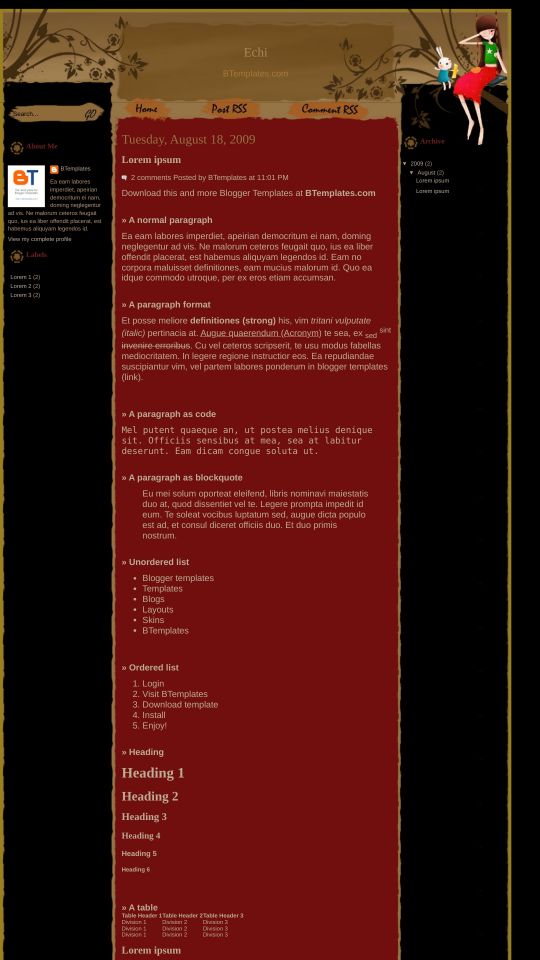
Echi is a free Blogger template with 3 columns, left and right sidebars, girly looking, vectorial elements and vintage style.
Excellent template for blogs about art, to write a diary or people.
More Art Blogger templates:

Credits
Author: SkinCorner.
Sylvia 22 August 2009 at 22:42
I really love this layout, but the top header never loads, even in the live demo. In the html file, the link to the header is correct, but for some reason it isn’t loading. Is it from many people trying to use it? Is there a way to fix it?
To Sylvia 23 August 2009 at 3:53
The header is appears even in your blog.
Claudia 23 August 2009 at 21:25
Yes: There is not problem with de header loading (anyway, if you want, you can move the images to a different hosting).
Thanks to the people who answered to Sylvia ;)
Sylvia 24 August 2009 at 2:53
Okay…sorry for the trouble. I still can’t get it to load on my computer (I use Firefox, so I would think that it should work fine), but at least I know that others can see it. I guess it’s a problem on my end. I’ll see if I can figure it out. Thanks for the help!
jess 24 August 2009 at 11:06
I LOVE IT! Thank you!!!
Lisa 25 August 2009 at 9:52
Hello there! It was love at first sight for this blogger template for me :) so thank you for creating such a wonderful template.
But I have a problem in the Page Elements part cause I can’t seem to move the gadgets around. Once you add it in, it’s stuck there forever and when I want rearrange the order, it wouldn’t let me.
Anybody has the same problem or solutions on how to fix it? It would be very much appreciated. :)
Lisa 25 August 2009 at 9:59
Hi, it’s me again. Just wanna say that there’s no more problem :). Love this template!
Lisa 25 August 2009 at 10:11
Oh yeah, I do have another question. Below the header section, there are – Home, Post RSS and Comment RSS, right? Well, how do I change the links to those three cause when I click on Post RSS and Comment RSS, it directed me to another page that is full of codes only and nothing else. Can I change the links and title?
Flor 25 August 2009 at 16:30
Oh yeah, I do have another question. Below the header section, there are – Home, Post RSS and Comment RSS, right? Well, how do I change the links to those three cause when I click on Post RSS and Comment RSS, it directed me to another page that is full of codes only and nothing else. Can I change the links and title?
——–
I’VE CHANGED THE TITLE BUT I CAN’T CHANGE THE LINKS, HOW CAN I DO IT?
Sylvia 25 August 2009 at 18:04
If you edit the code (on Blogger, click on EDIT HTML) when editing the layout, you can change those links. Scroll through the code. In green, you’ll see a part of the code labeled, “Menu,” (at the beginning, there’s a part labeled “Menu” in black–don’t change that).
You’ll see the addresses for those links there. Change the URLs only.
It looks like the labels aren’t text, but jpeg files, which means you’ll have to edit those files to say what you want, or create a new image to go in its place. Then upload and change the part of the code that tells the site where to get the image.
If you have questions about what I’m talking about, I’ll be glad to add more details (or perhaps someone who is better at explaining this can help).
eliezer 30 August 2009 at 12:17
valeu só template legal eu queria uma ajuda sua colocar em meu blog esse sistema de comentarios com fotos como posso fazer desde já agradeço a sua compreensão.
Claudia 31 August 2009 at 5:26
Cuál sistema de comentarios con fotos, eliezer?
napo 9 September 2009 at 15:33
ECHI jajajaj es lo que anime perverido, casi hentai
me encanto el nombre XD no tiene nada que ver la imagen esa
jue 9 September 2009 at 18:10
Hi, tq for this lovely template, ive been using this template about 2 weeks ago, its working fine with me n my browser (firefox), i can put many widget also
really3 loves the design..remind me of my childhood time :D very good n very nice job..thumbs up
regards,
julianna-Malaysia
Angelos 14 September 2009 at 9:12
Very beautiful theme. I was wondering: if someone wants to keep the template, but hide the girl is it possible? could anyone explain it to me please? i am not really good at this
Neena Auriel Chan 24 October 2009 at 8:33
Thanks lot…
I love it!!!
(So Much)
AnN 5 December 2009 at 10:22
This is a wonderful template but I’d like to change the font of the title, is that possible?
When I try to change the heading, there’s only the option of adding an image. I just want to keep the template the same but I want to change the font and enlarge the title of the blog.
Can someone help me, please?
Suou 24 December 2009 at 18:26
Muy hermoso tema….
Sofia 22 March 2010 at 2:54
Hi, thanks for posting this free template… I also love it, so simple and feminine… I agree with AnN, can somebody tell me how to change the font color and enlarge the blog title? It’s kinda hard to see the brown title on a brown background…