Water Color Blogger Template
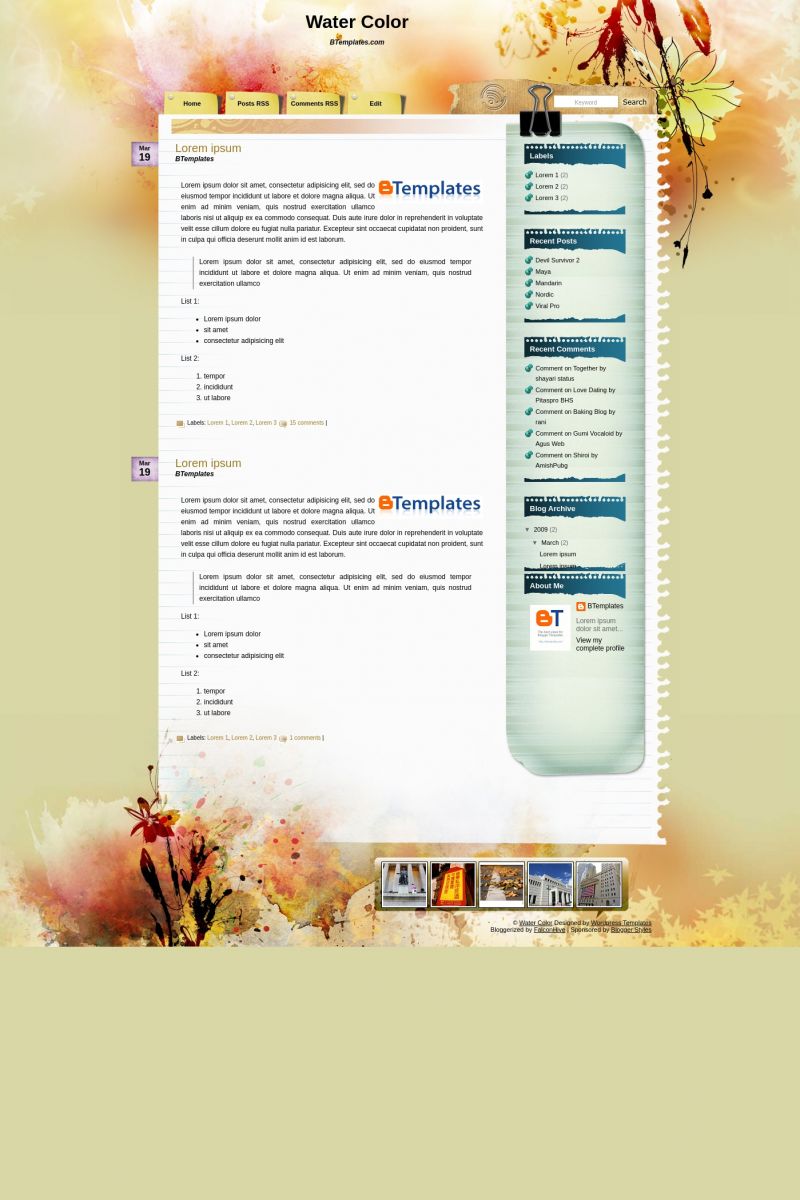
This template does not have a responsive design.

Instructions
About Water Color
Water Color is a free Blogger template adapted from WordPress with 2 columns, right sidebar, fresh look, grunge style and floral motifs.
Excellent template for blogs about art or fantasy.
More Art Blogger templates:


Credits
Author: Falcon Hive.
Designer: TemplateLite.
Technopress-Gr 13 May 2010 at 11:26
Really beautiful template. with a little work on the tabs could be perfect!
Sheryl 20 May 2010 at 22:29
does anyone know how can I arrange the search bar just to searchin in my own blog?
alguien sabe como arreglar la barra de busqueda que lo haga solo en mi blog?
Sheryl 20 May 2010 at 22:58
@Claudia:
me podrias ayudar? auno no puedo arreglar la barra de busqueda por mas que le agregue el code… gracias
Claudia 22 May 2010 at 21:33
@Sheryl: Si reemplazatse el código como se indica más arriba, debiese funcionar. Es recomendable que dejes la URL de tu blog cuando comentas (en el campo correspondiente) para poder chequear.
Grace 25 May 2010 at 17:43
The comment preview box is cut off on my blog. It won’t let people comment. Is there a way to fix this?
Claudia 25 May 2010 at 23:15
@Grace: Go to Settings -> Comments -> Show word verification for comments? -> No
nic 9 June 2010 at 0:11
great template! i need some help.
1. how do i get more than 4 menu links at the top? i have about 10 menu items i added, but only 4 are displayed.
2. has anyone tried to change the header and title using the original psd? i tried it but the problem is, following the instructions on blogger causes the new header/title image to be misaligned. i don’t know how to get it to align properly. help? http://www.templatelite.com/watercolor-free-wordpress-theme/
Luna Blue 24 June 2010 at 8:13
Lovely template!
Is there any way to fix the search option, though? It won’t search through the blog, but goes to another demo-template-site. Also, is it possible to remove the flicker gadget underneath the blog?
Thanks in advance.
Claudia 24 June 2010 at 11:57
@Luna Blue: In Design/Edit HTML, replace:
by:
gerald 27 June 2010 at 7:58
Im currently experimenting after using your tabs 01. . thank you
hep tasarım 7 July 2010 at 13:16
very nice.
i think i’ll use this template.
if a problem become, i’ll write here, ok :)
Raz Darnell 4 November 2010 at 14:53
Date doesn’t show up, and not compatible with Internet Explorer.
Claudia 5 November 2010 at 0:50
@Raz Darnell: To change de date, go to Settings/Formatting and change the “timestamp format” to something like “Friday, November 5, 2010”.
You’re right: this template is not fully compatible with IE. It’ll need to be fixed.
SJ 13 January 2011 at 14:26
Hello. I love this template and want to upload it on my brand new blog! I have downloaded the template to my computer and tried to upload it on my blog by doing the following: Design->Edit HTML->Upload (I uploaded the file “water-color.zip”). When I did this, the error message below was displayed.
“Edit Template
Edit the contents of your template. Learn more
We were unable to save your template
Please correct the error below, and submit your template again.
Your template could not be parsed as it is not well-formed. Please make sure all XML elements are closed properly.
XML error message: Content is not allowed in prolog.”
I have no idea what this means! What am I doing wrong? Any help would be appreciated. Thanks!
Gad 17 February 2011 at 4:53
Hi,
Thanks a lot for this beautiful template!
Since I don’t want to publish any photos in the footer, I wonder if anyone can provide me with a new bg_footer.jpg that doesn’t contain a room for the photos.
Jerin 1 April 2011 at 7:24
Looks good to me. But I wanna try other themes too first
ethical hacking 12 April 2011 at 7:37
a very nice template. the bgd is sleek.
sam 19 April 2011 at 6:08
hi
i love this template
but i don’t know what to do after i dwload it
it said that i’ve to extract it but i don’t know how
and it turned out can’t process that xml.
thanks!
i got it now!
love it
Claudia 19 April 2011 at 18:57
@sam You can find the answer to your questions and more in our FAQ section.
hisa 21 April 2011 at 14:19
mine is very simple but
just look at it
interested with my product? just send me a text or email
cheers
Hisa
Dae 30 June 2011 at 17:08
I cannot get the search bar to work. :( Help with the code?
Claudia 30 June 2011 at 23:04
@Dae: Go to Design/Edit HTML and replace:
by:
Penny Ward 18 August 2013 at 13:10
This fix you keep showing for the SEARCH box does not work for me.
You will see the ERROR message I keep getting.
Any suggestions?
Mishkat 30 June 2011 at 23:28
I like this template very much.
Diana 8 July 2011 at 9:49
Olá. Não consegui comfigurar adequadamente a data na lateral da postagem. Como faço?
Hi I could not properly comfigurar the date on the side of the post. How do I?
Diana 8 July 2011 at 9:57
Olá
O campo “pesquisa” não funciona adequadamente. Como editar?
Hello
The “research” does not work properly. How to edit?
Usman 23 August 2011 at 8:15
AWESOME Template.. But I’ve a problem too .. Hoe to edit the last tab i.e Named FLICKER .. I’m sucked. I edit the html but the image does’nt appear like that in template preview .. HELP ME OUT PLZ ..
umiabie 20 September 2011 at 14:28
nice template.. thanks..
Popchic 6 December 2011 at 2:51
the download link looks broken or is it just my connection? argh! can’t download T.T
asoi 9 December 2011 at 7:00
nice.. tq
Sky 2 January 2012 at 17:55
Were do i get the code?
Debbie 13 January 2012 at 15:58
Loving the template…just emailed…anyway we can change the top tabs to be the months instead for those of use that do not use comments or RSS feeds etc.?????
Creative Reflections 22 February 2012 at 11:25
@Croaker:
Thankyou! This was the perfect fix!!!!
Jason G 23 March 2012 at 12:42
Great template!
Question 1: I cannot seem to get the Blogger share buttons to show up at all. Is this something I should expect?
Question 2: Also the fix for the search button includes double quotes and that produces an error. How to resolve?
charmz 18 April 2013 at 3:35
Hi there, were you able to figure out the share button for this template…?
Ysaura 26 August 2012 at 10:25
Esta muy linda la plantilla, voy a probarla
Miguel | Gana dinero con encuestas 26 August 2012 at 10:26
Hola, tengo un problema con esta plantilla, por mas que la instalo como es no me aparece en mi blog
Andres 26 August 2012 at 10:46
Yo tengo el mismo problema, no se como poner los videos
Rajesh yadav 27 October 2012 at 3:03
I LIKED THIS TEMPLATE VERY MUCH…..THE COLOURS ARES SO VIVID
AND THE DESIGNS ARE AWESOMEEEEE…..
THANK U FOR SHARING SUCH A BEAUTIFUL TEMPLATE WITH US.
Noelia Películas 15 January 2013 at 14:51
Me he pasado un buen rato buscando plantillas para mi web y por fin la encuentro.
Muchas Gracias.
sarki cevirileri 5 March 2013 at 7:41
wow, this looks pretty good. thanks!
Ariel Kao 21 May 2013 at 12:19
my dates dont show up….they say undefined for some reason, does anyone know why?
Kristina 25 August 2013 at 9:36
Hi, I have downloaded the template but when I upload it comes up with this
We were unable to save your template.
Your template could not be parsed as it is not well-formed. Please make sure all XML elements are closed properly. XML error message:
Content is not allowed in prolog.
How can I fix this?
I have downloaded off about three different sites and everything is the same!
Geri Christensen 3 August 2014 at 9:37
I would like to know how to remove the date tag from a blog post on this template. I love it and it works perfectly for my blog. However, I will only have one post as the purpose is to use the pages element for book chapters. If it isn’t possible to remove the date, how can I create a static front page without a date for the original page that comes up? Thank you for any help you can give me.
sandybrownpop 19 November 2014 at 23:59
Excellent template!!! Very useful for blogs.
Anox 13 January 2016 at 15:12
Thank you! This template is awesome, I’m using it!