Furniture Blogger Template
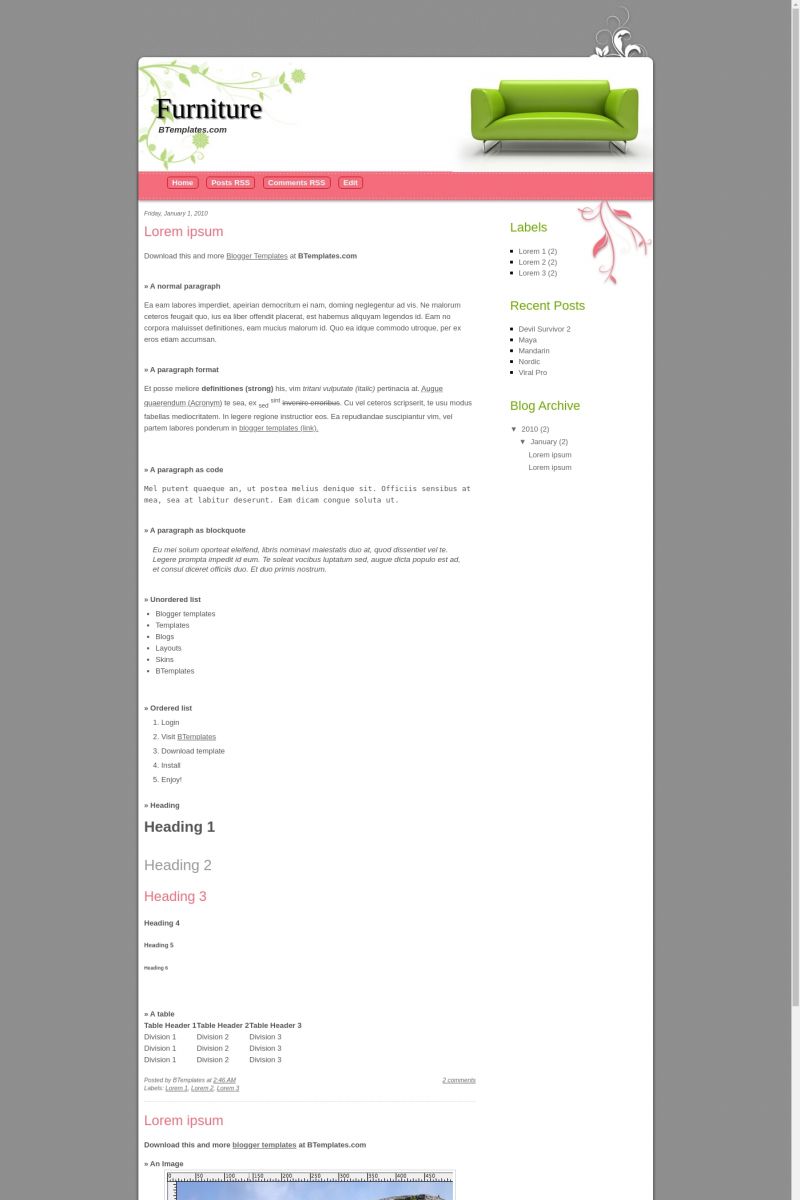
This template does not have a responsive design.
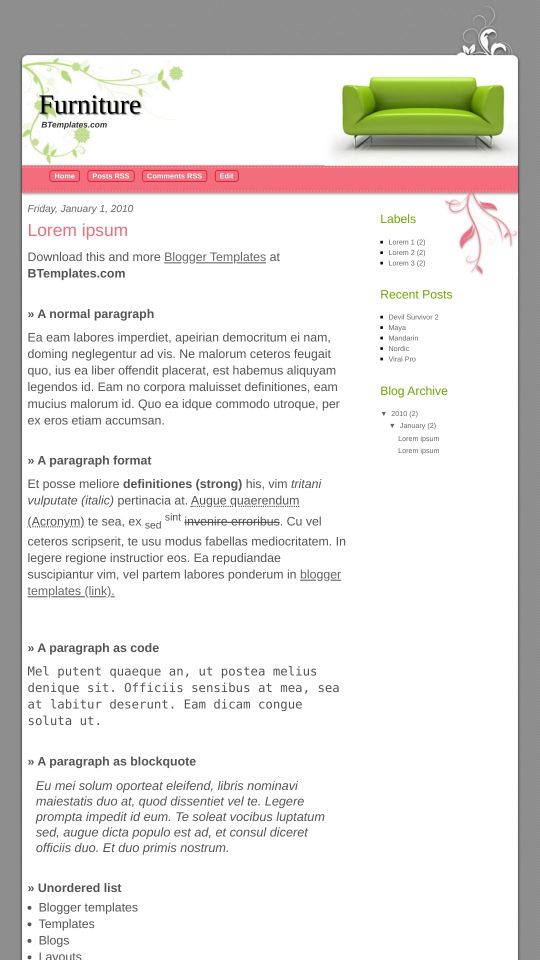
Instructions
About Furniture
Furniture is a free Blogger template adapted from WordPress with 2 columns, right sidebar, rounded corners and floral motifs.
Excellent template for blogs about to write a diary or home and decoration.
More Adapted from WordPress Blogger templates:
Credits
Author: Templates Block.
Yette 15 January 2010 at 2:28
hi, this is a really good template.i was just wondering if i could change the header? thanks :)
Volverene Evo 19 January 2010 at 3:22
Yes you can change the header but that might not look good. Ofcourse in your edit the header image to your requirements, change the couch to something else :)
Kortney 21 January 2010 at 20:05
Just gave it a go–works well!!
Volverene Evo 21 January 2010 at 20:18
Thanks Kortney :)
Ashley 22 January 2010 at 23:54
Beautiful template! How can I remove the couch and add a photo of something else? Can you tell me where in the HTML code I need to go?
Thank you!
Volverene Evo 23 January 2010 at 1:56
Dear Ashley, Here`s what you need to do:
Goto EDIT HTML: and using [CTRL+F], find “headerbackground”, the brower will highlight the following code:
#headerbackground {
height: 250px;
padding: 100px 15px 0px 15px;
background:url(https://1.bp.blogspot.com/_k_DnmK4oz2Q/S0cvgd1CCHI/AAAAAAAAAT4/G2BKldo7fiY/s1600/background_header.jpg) no-repeat;
}
Copy the above image URL “https://1.bp.blogspot.com/_k_DnmK4oz2Q/S0cvgd1CCHI/AAAAAAAAAT4/G2BKldo7fiY/s1600/background_header.jpg” and open this link in a new window. It`ll ask you to save the image. Save it on your harddrive. Now you`ll have to edit this image in Photoshop or Corel Draw the way you want :)
Again upload your edited image using http://www.imageshack.us or tinypic.com. and paste your image`s direct link into this same code above in the EDIT HTML of your template. Click PREVIEW to see your foto on your blog :) Should you still require any other asistance, don`t hesitate to ask :)
Mandi 9 February 2010 at 14:03
Hi, thanks for the terrific layout! I’ve installed it for my new blog, but the navigation buttons are a bit too high. How can I fix this so that it looks like it does in the demo?
Ashley 9 February 2010 at 21:42
Volverene,
Thank you SO much! This is by far the best template out there for what I need. It’s sleek, clean and appealing to the eye. You are AWESOME! Thank you for your instructions about the header pic!
Warm regards,
Ashley
Volverene Evo 11 February 2010 at 9:15
Ashley: Great feedback and motivation for me to continue this work :)
Volverene Evo 11 February 2010 at 9:22
Mandi: Keep the header title and header descriptions with limited characters. But now I see that it looks fine on your blog. I hope you must have fixed it. Thanks :)
Sam 11 February 2010 at 15:21
Love the template! And thanks for the details about how to change the pic!
On my blog the red buttons do not show up on the pink line of the header, they show up just underneath it, blocking the date and title of my top post. How do I fix that? Thank you!
Volverene Evo 12 February 2010 at 22:31
Sam: Please let me know about your Blog`s link on which you`re having this issue so that I can properly identify the problem and provide you with possible solutions on how to fix it.
brankas 14 February 2010 at 12:44
tks buat templatnya ya bagusssss…..nice
Kim 16 February 2010 at 13:58
I tried to change the header and I’m having the same problem as Sam, except the links are showing up IN the banner. I did pull the banner into photoshop to strip out the couch, and pull in pics of my daughter. That’s all I changed (no size change, etc). When I pulled in the new URL, the links moved. How to fix?
Noémi 21 February 2010 at 13:58
I love the template, but two things i would love to change:
1) make the entire template wider so that there is more white space on the sides and less grey space
2) reduce the huge chunk of grey space above the header
If this is possible please let me know!?
Thanks and great job!
Volverene Evo 23 February 2010 at 7:01
Noemi: I`m afraid that`s quite not possible as the template uses fixed image backgrounds :'(
Heday 23 February 2010 at 8:01
Great work with simple but elegant templates.I wonder if it is possible to take out the couch picture without replacing it with any other picture.If possible can you show me how to do so.Thanks in advance.
Volverene Evo 23 February 2010 at 8:26
Heday: Yes I actually have explained the procedure in the previous comments on this page. Thanks :)
Heday 23 February 2010 at 14:17
Thank you so much!I’ve done it.Thanks again.
Volverene Evo 23 February 2010 at 19:33
Heday: You`re welcome :)
Yourcenar 27 February 2010 at 14:09
Hi, it’s a BEAuTIFUL template! It’s perfect for me!*.*
So I would want to change to imagine adding my blog’s name. I don’t like the blogstpot’s title in black… I would want my name in pink!:D
Sossy for my english, can you help me please?
Thanks a lot Volverene!;)
Yourcenar 27 February 2010 at 14:10
Ops “sorry” not “sossy”xD
Volverene Evo 27 February 2010 at 21:06
Yourcenar: Goto EDIT HTML page. Using CTRL+F, find ‘#header {‘
The browser will highlight the following code:
#header {
width: 500px;
margin: 0;
text-align: left;
color:#000000;
}
#header h1 {
margin: 60px 0 0 0;
padding:0px 0px 0px 30px;
line-height:1.2em;
text-transform:normal;
letter-spacing:0em;
font: normal 50px Trebuchet MS, Serif;
text-shadow: 2px 2px 2px #666666;
}
#header a {
color:#666666;
text-decoration:none;
}
#header a:hover {
color:#666666;
}
#header .description {
margin:0;
padding:0 20px 15px 35px;
max-width:500px;
text-transform:normal;
letter-spacing:0em;
line-height: 1.4em;
font: bold italic 15px ‘georgia’, Trebuchet, Arial, Verdana, Sans-serif;
color: #333333;
}
Look at the above code carefully, in each code set, there is small code which puts color to the text like “color: #333333” you will find this ‘color: #xxxxxx’ in each code set.
Just replace the color code, that is ‘#333333’ with the color code of your choice. For example, I have choosen a pink color code which is ‘#FF0080’, so you just need to replace color codes and click PREVIEW when done :)
Thanks :)
Yourcenar 28 February 2010 at 10:02
First of all thanks so much!;)
For the time being it goes very well, but if I wanted to change also the text’s position, for example: I want to write the blog’s title over the imagine, so in gray space, what I must make? Position center and with new font.
So I put the description in imagine, as you have suggested, near flower’s picture or center.
But Blogpost continues to give me like obligatory the heading’s title (page elements etc).
Thanks a lot Volverine, I am incapable but your template is my favourite!:(
Thanks, thanks, thanks!
Yourcenar 1 March 2010 at 11:52
I have not been clear perhaps?:(
I dont’ want the blogspost’s title, I want that it is in the image, like nearly all the blogs.
Volverene Evo 3 March 2010 at 9:35
Yourcenar: You`re welcome. You can try to put up an image instead of the text title,
I think you can try this last one:
Goto Dashboard < LAYOUT < Page Elements:
click 'EDIT' on the Header element. There, it`ll give you the option to upload your picture instead of text title.
Madelief 8 March 2010 at 10:49
Thank You! I love this template!
Rini 9 March 2010 at 8:42
Hi. I love this template. I use it for my blog. But when I click edit, home, there’s nothing happen. Why is that? I should use back button at window to edit my blog. Can u help me? thanks before :)
Karine 16 March 2010 at 10:19
i loved this template but i have the same Sam’s problem
Please help me!!!!!
Thanks a million!!
Volverene Evo 18 April 2010 at 1:29
Madlief: You are welcome :)
Volverene Evo 18 April 2010 at 1:31
Karine: Please let me know your Blog’s URL so that I can fix it for you :)
Volverene Evo 18 April 2010 at 1:32
Rini: Please let me know your Blogs URL so that I can identify the problem and fix it for you :)
James 18 April 2010 at 21:23
Wow great template. Thankyou
Volverene Evo 19 April 2010 at 4:51
James: You are welcome :)
mooi 11 May 2010 at 4:21
@Volverene Evo:
Hi, thanks for the great template. I am having similiar problem as Sam where the red buttons do not show up on the pink line of the header, they show up just slightly on top of it. How do I fix that?
Thank you very much.
mooi 13 May 2010 at 22:33
@Volverene Evo:
Hi, I had another problem which I had just notice, I had set 3 posting per page out of 9, at my blog I only can see the lastest 3 posting (at page 1) and another last 2 posting (at page 2). While the other I can’t see unless I click the posting name at my Label. Please advice how can I fix this.
Thanks
Theresa 31 May 2010 at 0:12
Hi there!
LOVE this template!
I have a few questions, not sure if they are things I can change or not, but if they are, I would love some instruction on how to change them. :)
BIGGEST #1 QUESTION: How do I change the tabs at the top (ie: the ones that say “Posts RSS”, “Comments RSS”, and “Edit”??? I would like to change them, but I also need to know how to change the link that they then go to. :)
2. Is there a way to make the tabs on the top into little pictures or icons?
3. When I click on “edit” to edit my blog it does nothing.
Claudia 1 June 2010 at 1:58
@Theresa You can find the answer to your questions and more in our FAQ section.
Theresa 1 June 2010 at 2:06
I figured it all out on my own, except for the possibility of figuring out how to make the buttons/tabs into icons or pictures instead. But that’s not a huge deal anyways. ;)
Thanks! :)
Gary 21 June 2010 at 9:35
It is really a great template
However noticed that home page don’t have link for newer post, home and older post….
Wonder how to change it?
Claudia 24 June 2010 at 3:04
@Gary: Navigation links are properly added to this template but they are not visible in our demo. If you install the template and set the n° of posts to be displayed to a reasonable number(in Settings/Formatting), you won’t have any trouble.
Volverene Evo 25 June 2010 at 0:01
Dear users of Furniture template: If your Page Navigation Links (Older Posts, Newer Posts) are not working with this template, here’s what you need to do to fix this:
1. Goto EDIT HTML page.
2. Using CTRL+F, find any of the following link:
“http://evo13.googlecode.com/files/nav-12.js”
OR
“http://all-in-one-blogger-widget.googlecode.com/files/paginator3000.js”
3. When you find any of the above two links. Replace it with the link below:
“https://www.opendrive.com/files/6549279_VT1Jl/paginator3000.js”
4. Click SAVE and VIEW BLOG to see the page navigation links come back again.
That’s it!
For any further assistance that you may require, please do ask :)
Thank you
Volverene Evo 25 June 2010 at 0:02
@Gary: Please read above comment :)
Volverene Evo 25 June 2010 at 0:03
@mooi: Please read above comment about fixing page navigation :)
Volverene Evo 25 June 2010 at 0:04
All: Please let me know your blog URL or contact me at my blog. I’ll be happy to help you with customization of this template :)
Volverene Evo 25 June 2010 at 5:31
Dear users of Furniture template: If your Page Navigation Links (Older Posts, Newer Posts) are not working with this template, here’s what you need to do to solve this:
1. Goto EDIT HTML page.
2. Using CTRL+F, find any of the following link:
“http://evo13.googlecode.com/files/nav-12.js”
OR
“http://all-in-one-blogger-widget.googlecode.com/files/paginator3000.js”
3. When you find any of the above two links. Replace it with the link below:
“https://www.opendrive.com/files/6549279_VT1Jl/paginator3000.js”
4. Click SAVE and VIEW BLOG to see the page navigation links come back again.
That’s it!
For any further assistance that you may require, please do ask :)
Thank you
Arif Shaik 3 July 2010 at 10:59
publishing pictures does not improve the site listings Mate. If you add some information needed will give appearance and improves the visting of your site. All the best.
Volverene Evo 3 July 2010 at 20:01
@Arif Shaik: Thank you :)
Natalina 7 September 2010 at 6:10
Hey there friend!
Another great layout! Absolutely stunning! Keep up the great work!!!
So I snatched this layout…..buuuut ofcourse I have a question (I know, I’m a pain!) Somewhere halfway the sidebar, there is an gadget I can’t move/remove. it’s the ‘powered by blogger’ gadget. Now I don’t mind at all having that on my blog, but not in that particular position, is there a way to move it? :) xxx
Natalina.
Heidi Rawe 4 April 2011 at 22:06
I would like to edit the blocks within the pink bar. Is this possible?
DaLesa 23 June 2011 at 13:18
I LOVE this layout but how can I change the font?? I went to the Adavanced options etc, I changed it but it didn’t show up once I saved it. Do you know why this i?
Chenay 14 September 2011 at 13:39
Hi there! LOVE the template but would like to change the font of my blog title. HELP! :)
Tomoe 10 November 2011 at 14:54
Hello, there.
I really love your template and enjoy using it!
I don’t know if other users could solve the “older post” link issue.
well…. I can’t…
I found this link on my HTML
“http://all-in-one-blogger-widget.googlecode.com/files/paginator3000.js”
and replaced it to
“https://www.opendrive.com/files/6549279_VT1Jl/paginator3000.js”
but it still doesn’t work.
and also I set as “show 7 posts”, but it doesn’t show as I set.
Please take a look at my blog and give me some advice.
Thank you very much for your help
harwinder singh 5 July 2017 at 0:57
hello!! i love this template, and i m using this template and its very good.
PLEASE TO CHECK MY BLOG AND TO GIVE ME SOME ADVISE.
THANK YOU VERY MUCH FOR YOUR HELP!!!